AI Action Figure Generator Guide 2025: Best Workflows, Prompts, and Tool Choices
A current guide to making AI action figure images with ChatGPT, Midjourney, one-click generators, or API workflows. Includes a decision matrix, prompt architecture, troubleshooting fixes, and privacy tips.
Nano Banana Pro
4K图像官方2折Google Gemini 3 Pro Image · AI图像生成
已服务 10万+ 开发者
If you are trying to turn one photo into a boxed action figure image that is good enough to post on LinkedIn, ship in a campaign mockup, or use as a playful profile asset, the hardest part is not finding "an AI action figure generator." The hard part is choosing a workflow that preserves likeness, renders packaging text well enough to feel intentional, and does not waste paid generations while you guess at prompts.
This guide is written for that exact scenario. Instead of giving you another generic list of prompts, it shows which tool to use for your goal, what tradeoff you are accepting, and how to fix the most common failures when the first result looks wrong. That makes it more useful than a one-click landing page or a template-heavy tutorial.

TL;DR
- If you want the fastest path from one selfie to a convincing boxed figure, start with ChatGPT image generation. Image creation is available on ChatGPT Free with tighter limits, while paid tiers expand access(OpenAI Pricing; OpenAI Help Center, verified 2026-03-18).
- If you care more about stylization and art direction than literal packaging accuracy, Midjourney is often the better fit. Its plans currently start at $10/month, while unlimited Relax mode starts at Standard and Stealth Mode starts at Pro(Midjourney Docs, verified 2026-03-18).
- One-click action-figure generators are fine for quick social content, but they are usually the weakest choice for likeness control, packaging copy, and serious brand work.
- The real differentiator is not the prompt alone. It is choosing the right workflow, then repairing failures in a structured way. Use the decision matrix and troubleshooting table below before you burn extra credits.
- The action-figure trend took off after OpenAI introduced 4o image generation on March 25, 2025(OpenAI, verified 2026-03-18). But do not build your workflow around an old "pick GPT-4o first" tutorial. OpenAI's current help and release notes describe image generation as a ChatGPT capability, while current-model and legacy-model access are handled separately in the product(OpenAI Help Center, verified 2026-03-18).
What kind of action figure image are you actually trying to make?
Most people searching for an AI action figure generator are not doing the same job. Some want a fun post for social media. Some want a polished "mini me in a blister pack" image for a team profile. Some want concept art for a real toy prototype. Some need to batch-generate dozens of branded figures for an onboarding or campaign workflow. If you do not separate those cases first, you will pick the wrong tool and then blame the prompt.
The shortest useful question is this: do you need speed, likeness, art direction, or scale? ChatGPT is usually the best default when likeness and editable conversation matter. Midjourney is usually stronger when you want dramatic stylization and are comfortable iterating visually. One-click generators are mostly convenience products. API workflows only make sense when you need repeatability, automation, or cost control across many outputs.
That is also why many competing guides feel disappointing. They treat "AI action figure" as one task, when it is really four different tasks hiding behind one search term.
The decision framework: ChatGPT vs Midjourney vs one-click generators vs API
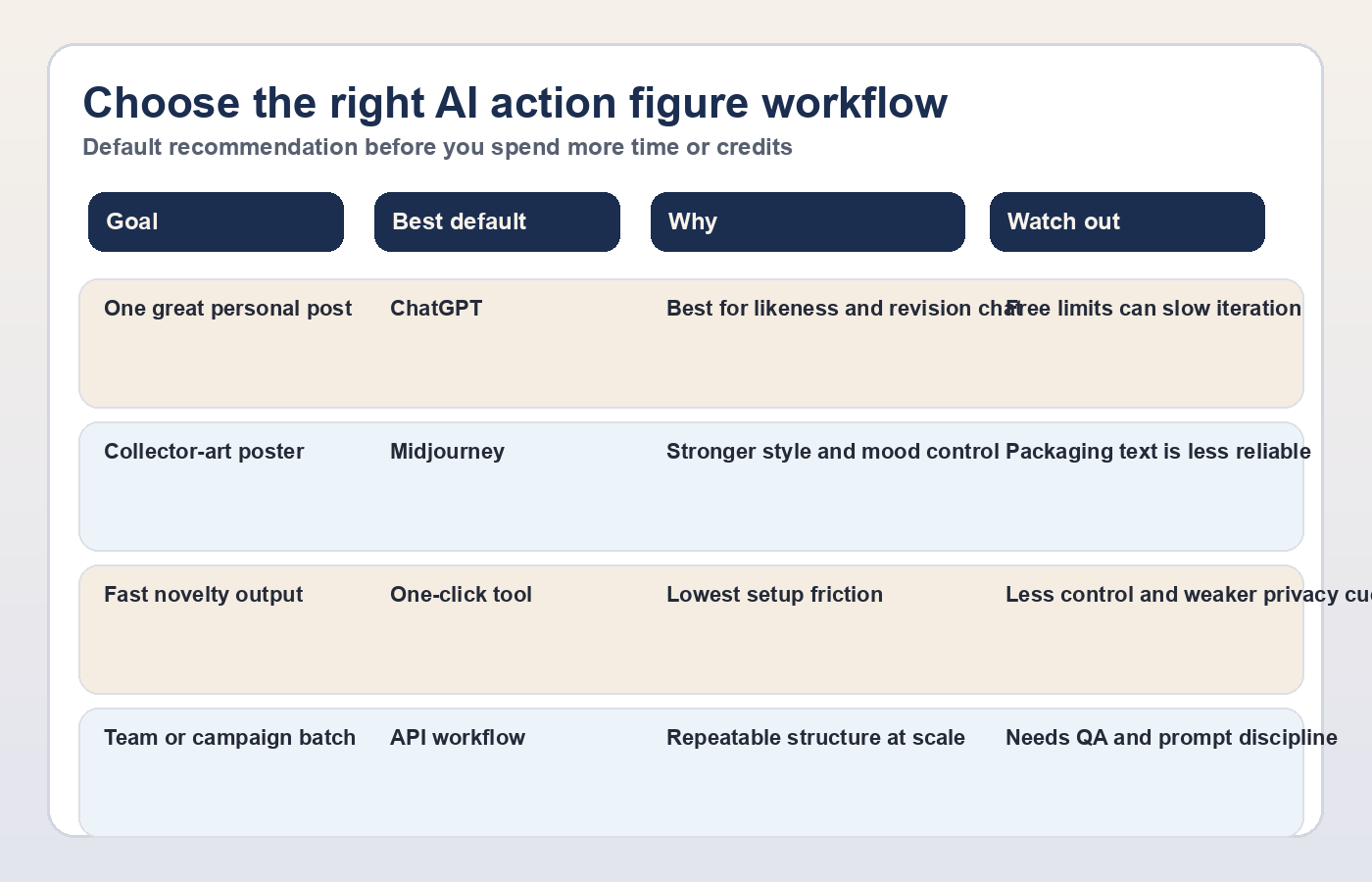
Use this table before you upload anything:
| Your goal | Best default | Why this is the default | What to watch out for |
|---|---|---|---|
| One polished action figure from one personal photo | ChatGPT | Easiest conversational edits, strong likeness, easy upload flow | Free tier limits can slow iteration |
| Highly stylized collector-box artwork | Midjourney | Better art direction and more dramatic visual mood | Extra prompt skill, weaker text-in-packaging reliability |
| Fast novelty result for social posting | One-click generator | Lowest setup friction | Less control, repetitive templates, unclear privacy practices |
| Branded team series or campaign batch | API workflow | Repeatable structure, automation, controlled prompts | More setup work and QA required |
| Toy concept or packaging exploration with many variants | ChatGPT first, then Midjourney or API | Good for fast exploration before moving into higher-control refinement | Mixing tools too early can create inconsistent series output |
The practical recommendation is simple. Start in ChatGPT unless you already know you need Midjourney-style art direction or you are building at scale. That advice holds because ChatGPT image generation is now a built-in product capability rather than a workaround, and both Free and paid plans support image creation with different usage ceilings(OpenAI Pricing; OpenAI Help Center, verified 2026-03-18).
Midjourney still matters, but for a narrower reason than many articles imply. It is not automatically the best action-figure tool. It becomes the better choice when you care more about mood, styling, materials, and dramatic composition than about a clean consumer workflow or editable packaging copy. Midjourney's current official plan ladder is Basic $10, Standard $30, Pro $60, and Mega $120 monthly; unlimited Relax mode begins at Standard and Stealth Mode begins at Pro(Midjourney Docs, verified 2026-03-18). That pricing only makes sense if you know you will use that extra control.
The current ChatGPT workflow that works best
If your target is "make me look like a believable boxed collectible," ChatGPT is still the most practical place to begin. OpenAI launched 4o image generation on March 25, 2025 and rolled it out across ChatGPT tiers, which is what kicked off the first major wave of action-figure posts(OpenAI, verified 2026-03-18). Since then, the product surface has changed. The consumer instruction is no longer "pick GPT-4o and hope for the best." OpenAI's current help and release notes describe image generation as a ChatGPT capability, and current-model versus legacy-model access is handled separately in the product(OpenAI Help Center, verified 2026-03-18). The better instruction is simply: use ChatGPT's current image-generation workflow and focus on the input quality and prompt structure.
The best ChatGPT workflow is still straightforward. Upload one strong reference photo, describe the packaging and accessories, then iterate in the same conversation. This is where ChatGPT beats most dedicated generators: the repair loop is conversational. You can say "keep the face, change the accessories, make the box typography cleaner, and switch the color palette to cobalt and cream," and the model usually understands the delta more naturally than template-driven tools.
That does not mean the free tier is frictionless. ChatGPT Free supports image generation, but OpenAI explicitly documents separate rate limits for file uploads and create-image usage(OpenAI Help Center, verified 2026-03-18). If you know you will iterate heavily, paid access saves time. ChatGPT Plus remains $20/month and includes image generation, while ChatGPT Go is now offered in all ChatGPT-supported countries as a lower-cost tier with extended access compared with Free(OpenAI Help Center, verified 2026-03-18).
For readers who are still choosing their prompt strategy, our broader ChatGPT image prompt guide is useful background. If your main concern is free-tier friction, check the repo's more detailed breakdown of ChatGPT free image generation limits.
The prompt architecture that produces better boxed figures
The prompt that works best is not the longest prompt. It is the prompt that gives the model a clean hierarchy: subject, figure style, packaging style, accessories, text treatment, and output constraints. When people get weak results, they usually jam all of those into one vague sentence.
Use this structure instead:
textCreate a collectible action figure image based on the uploaded photo. Subject: - Keep the person's facial features recognizable. - Build the figure as a full-body toy with articulated joints and realistic molded plastic proportions. Packaging: - Place the figure inside retail blister or window-box packaging. - Title on package: [FIGURE NAME] - Subtitle or series label: [SERIES NAME] - Color palette: [COLORS] - Overall style: [retro toy / premium collector / modern tech brand / comic-book hero] Accessories: - Include exactly 3 accessories in separate compartments: 1. [ACCESSORY] 2. [ACCESSORY] 3. [ACCESSORY] - Make every accessory clearly related to the person's role or personality. Visual constraints: - Clean studio lighting - Front-facing package - Legible packaging layout - High detail on figure face and hands - Avoid extra limbs, duplicate accessories, and warped plastic edges
That structure works because it tells the model what must stay stable and what can change. The most important line is usually the subject constraint. If you do not explicitly protect facial likeness, the model may over-index on the packaging concept and under-deliver on recognition.
For most readers, the best second prompt is not "make it better." It is a surgical revision like this:
textKeep the same face and package layout, but replace the accessories with a notebook, a camera, and a silver laptop. Tighten the package typography and make the figure look more like a premium collectible sold in a design store.
That kind of iteration is where ChatGPT usually outperforms one-shot generators for this specific use case.
How to fix the four failures that waste the most time
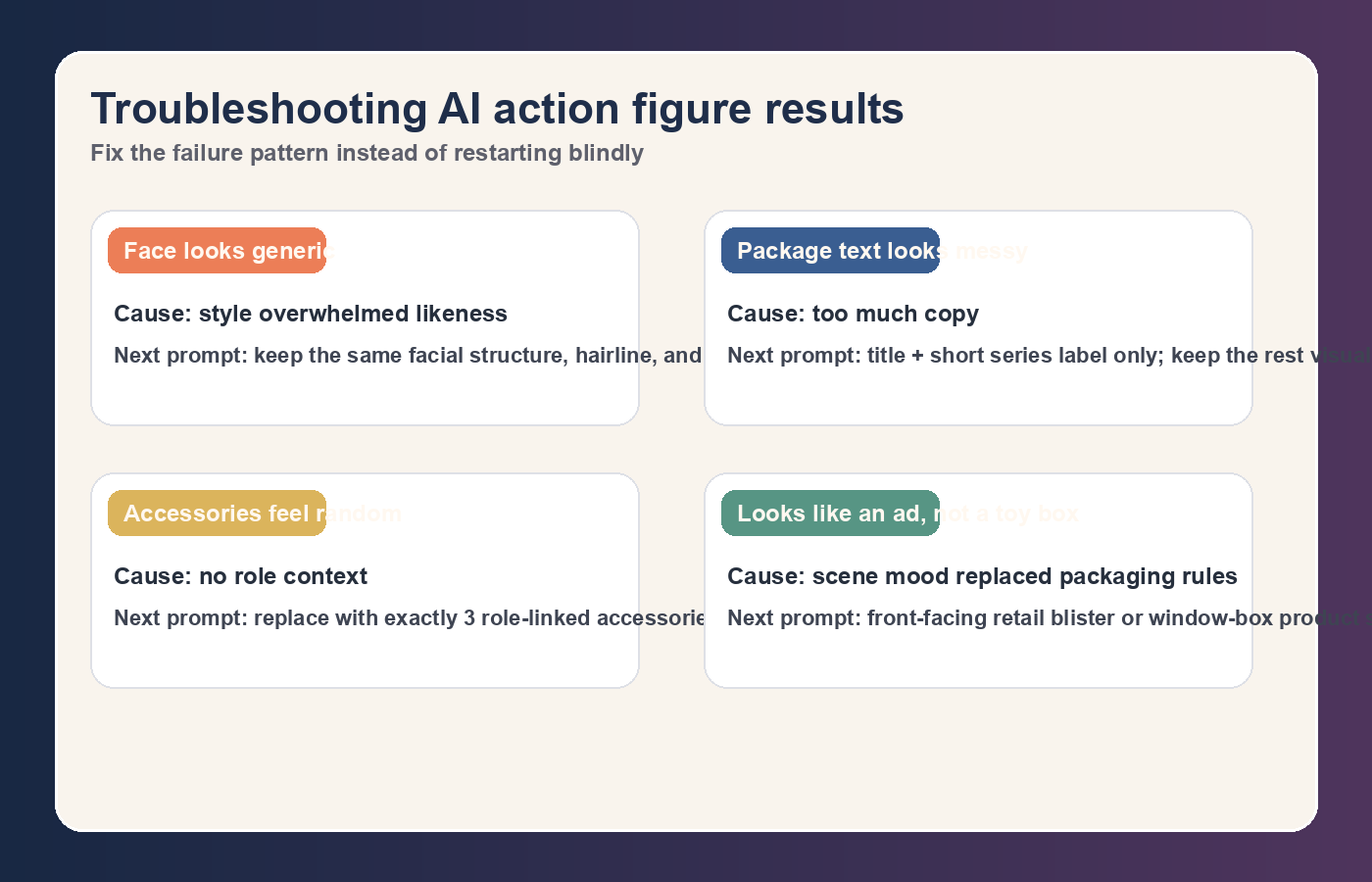
Action-figure images usually fail in repeatable ways. If you know the failure pattern, you can often rescue the image in one more round instead of starting over.
| Failure | Usual cause | Better next move |
|---|---|---|
| The face looks generic, not like the person | Prompt over-emphasized style and under-specified likeness | Re-anchor the face: "keep the same facial structure, hairline, and expression from the uploaded photo" |
| The box text looks messy or fake | Too many words or overly specific copy requirements | Reduce copy to title + short series label; keep the rest visual |
| Accessories feel random | Prompt asked for "fun" accessories without role context | Replace with role-linked items such as camera, sketchbook, stethoscope, headset, laptop |
| The result looks like a toy ad, not a collectible figure package | Prompt describes scene mood, not packaging constraints | Reassert front-facing retail package, blister or window box, studio product shot |
The bigger lesson is that you should debug one variable at a time. If you change the pose, background, lighting, accessories, and packaging style in the same revision, you will not know what actually fixed the image. This sounds obvious, but it is why people burn through paid generations so quickly.
If the output keeps drifting, reset with the original photo and the same packaging structure rather than continuing an increasingly messy thread. A clean restart is often cheaper than a long rescue sequence.
When Midjourney or one-click generators are the better choice
ChatGPT is the best default, not the best answer to every version of this task. If you want a cinematic collectible poster, not a convincing retail package, Midjourney can give you more dramatic lighting, stronger material styling, and a more opinionated visual language. That is especially true when you want the figure to feel like concept art for a premium toy line rather than a clean consumer mockup.
One-click generators make sense in a different corner of the market. They are good when your priority is speed over control. If you want a light social post in five minutes and you do not care whether the face is slightly softened or the package text is partly decorative, those products are fine. The problem is that many landing pages market this convenience as if it were a universal solution. It is not. The moment you care about brand alignment, role-specific accessories, or consistent team-wide outputs, you usually outgrow them.
That is why the wrong tool often feels "good enough" on generation one and terrible by generation three. You only discover the limitations after you try to make a specific correction.
When to move to API or batch generation
You do not need API access for a single fun image. You do need it when the job stops being personal and becomes operational. That includes employee onboarding kits, conference campaigns, e-commerce bundles, creator merch tests, or any workflow where a team must generate many figures with consistent packaging rules.
For that class of work, the decision changes. You care less about conversational convenience and more about repeatability, cost accounting, and output QA. OpenAI's current image API positioning centers on GPT Image 1.5, and its listed 1024x1024 pricing is about $0.009 for low, $0.034 for medium, and $0.133 for high quality per image(OpenAI Developers, verified 2026-03-18). That cost model is manageable if you are generating hundreds of branded variants, but only if you standardize prompts, naming, and review steps.
There is also a trust and compliance angle here. OpenAI says generated images include C2PA metadata(OpenAI; OpenAI Developers, verified 2026-03-18). That is useful if you need internal traceability for brand teams or clients. At the same time, API work increases the importance of a prompt template, a review queue, and a "reject or repair" policy. Scale does not remove editing; it multiplies the cost of sloppy prompt design.
Privacy, copyright, and publishing checks before you share
This is the section most competitor pages skip, even though it affects real decisions. If you are uploading a personal photo into ChatGPT, OpenAI says personal conversations may be used to improve models unless you opt out, and Temporary Chat is available for extra privacy(OpenAI Help Center, verified 2026-03-18). For a casual meme, that may be acceptable. For internal company work, client faces, or children's photos, it changes the workflow decision immediately.
The copyright question is also often oversimplified. A custom action-figure image based on your own face is usually a much lower-risk case than using celebrity likeness, trademark-heavy brand packaging, or licensed characters. The safe rule is not "everything is fine for non-commercial use." The safe rule is to avoid recognizable third-party IP and get explicit approval for branded or client-facing work.
Before you publish or print, do one last check:
- Is the face still clearly the intended person?
- Are the accessories role-relevant rather than random filler?
- Is the packaging text short enough to look intentional?
- Would you be comfortable with the photo-handling and storage implications of the tool you used?
- If this is commercial work, do you have approval for any names, logos, and likenesses involved?
Those five questions matter more than whether the image was generated by the trendiest model.
FAQ
Do I need to select GPT-4o in ChatGPT to make action figure images?
No. The important correction is that you should stop following old tutorials that treat GPT-4o selection as the whole workflow. OpenAI's current help and release notes describe image generation as a ChatGPT capability, while model access and legacy model options are managed separately(OpenAI Help Center, verified 2026-03-18). For most users, the practical workflow is still upload photo, describe figure, and iterate in chat.
What is the best free AI action figure generator right now?
For most people, ChatGPT Free is the best place to start because it gives you native image generation with conversational revisions. The tradeoff is usage friction. OpenAI documents limits around create-image usage and uploads on Free(OpenAI Help Center, verified 2026-03-18). If you want several rounds of clean iteration, you may hit those ceilings faster than you expect.
When should I pay for Midjourney instead of using ChatGPT?
Pay for Midjourney when your success metric is style rather than convenience. If you want collector-art drama, richer mood, and more visual experimentation, Midjourney earns its price. If you want the shortest path to "this looks like me in realistic toy packaging," ChatGPT usually remains the better first tool.
Are one-click action figure generators worth using?
They are worth using when speed is the whole job. They are usually not worth using when the image must look like a real product mockup, preserve a person's identity closely, or fit a brand system. Their promise is convenience, not deep control.
Can I generate a full team or employee series this way?
Yes, but the workflow should change. For one or two people, ChatGPT is often enough. For ten, fifty, or hundreds of people, the better path is an API or automation workflow with a locked prompt template, accessory rules, brand palette rules, and a human QA pass. Otherwise the series will drift visually and cost more to clean up than to generate.
Is there a good prompt for professional or LinkedIn-style action figures?
Yes, but the best prompt is not a genre keyword. It is a role-aware packaging brief. Use the person's real role, give exactly three accessories tied to that role, keep the package copy short, and specify whether you want premium collector packaging or playful retail packaging. That gives you much more predictable results than a vague "make this person an action figure" prompt.
Can I turn these images into real physical toys?
They are useful as concept art, not as production-ready toy files. If your end goal is manufacturing, treat the image as a direction-setting asset and move into a separate 3D modeling workflow. The AI image is good at visual ideation; it is not a substitute for engineering a real articulated product.
Final recommendation
If you only remember one rule, make it this: choose the workflow before you write the prompt. Start with ChatGPT when you need likeness and easy revisions, switch to Midjourney when stylization matters more than packaging accuracy, use one-click generators only for low-stakes speed, and move to API only when the project becomes repeatable operational work.
That decision sequence saves more time, money, and frustration than any single "viral" prompt ever will.