Gemini 3 Pro Image API: Complete Developer Guide 2025 (Nano Banana Pro)
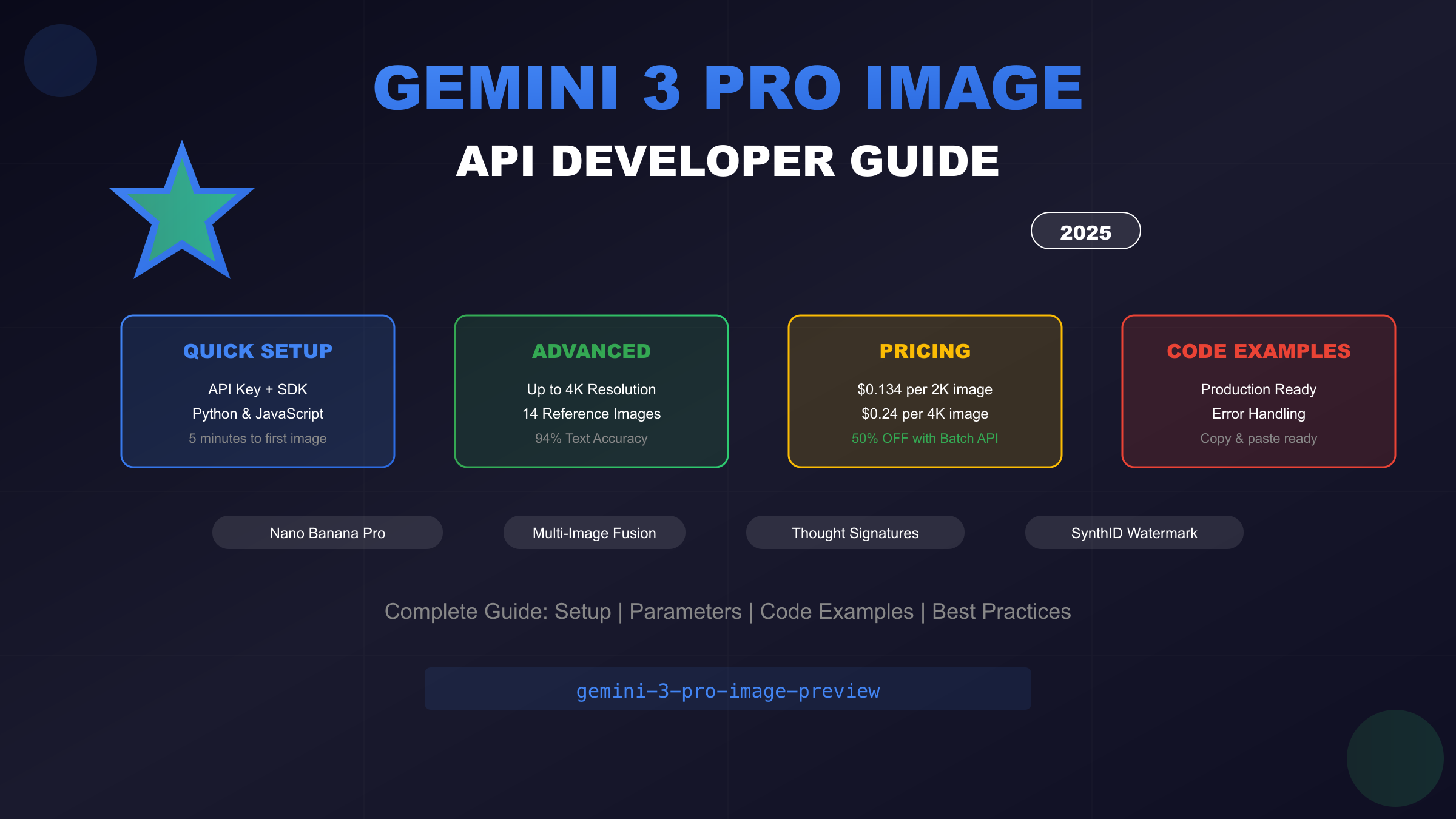
Master the Gemini 3 Pro Image API (Nano Banana Pro) with this comprehensive guide. Learn API setup, code examples in Python/JavaScript, pricing ($0.134-$0.24/image), advanced features, and best practices for 4K image generation.
Nano Banana Pro
4K图像官方2折Google Gemini 3 Pro Image · AI图像生成
已服务 10万+ 开发者
Understanding the Gemini 3 Pro Image API
The Gemini 3 Pro Image API represents Google DeepMind's most sophisticated image generation technology available to developers, offering capabilities that fundamentally change what's possible with AI-powered visual content creation. Known within the developer community as "Nano Banana Pro," this API delivers studio-quality image generation with unprecedented control over composition, lighting, and—most remarkably—text rendering accuracy that reaches approximately 94% correctness across multiple languages.
What distinguishes the Gemini 3 Pro Image API from previous generation models isn't merely incremental improvement but rather a qualitative leap in capability. The model can process up to 14 reference images simultaneously, maintain consistent identity across up to 5 human subjects, and output images at resolutions reaching 4K—specifications that position it firmly in the professional production tier rather than the experimental curiosity category. When developers need to generate marketing materials with accurate text, product imagery requiring precise composition, or multi-character scenes maintaining visual consistency, this API provides capabilities previously requiring extensive post-processing or multiple specialized tools.
The API integrates directly with Google's broader AI infrastructure, including Google Search grounding for real-time factual accuracy and SynthID watermarking that embeds imperceptible signatures in all generated content. This combination of generative power and responsible AI practices makes the Gemini 3 Pro Image API particularly suitable for enterprise deployments where both capability and compliance matter. Throughout this comprehensive guide, we'll explore everything from initial API setup through advanced multi-image workflows, providing working code examples and practical strategies for building production-ready image generation systems.
For developers already familiar with the Gemini ecosystem, our complete Nano Banana API guide provides additional context on how this model fits within Google's broader image generation offerings.
Getting Started: API Setup and Authentication
Before generating your first image, you'll need to configure API access through Google's authentication infrastructure. The process involves obtaining an API key, installing the appropriate SDK for your development environment, and verifying connectivity with a test request. While Google offers access through both Google AI Studio and Vertex AI for enterprise deployments, this guide focuses on the Google AI Studio pathway as it provides the fastest route to working code.
Obtaining Your API Key
Navigate to Google AI Studio and sign in with your Google account. The interface presents a straightforward "Create API Key" button that generates credentials immediately. Unlike some Google Cloud services requiring project setup and billing configuration, AI Studio keys work out-of-the-box for development and testing with generous free-tier quotas.
Store your API key securely—never commit it directly to source control. The recommended approach uses environment variables that your application reads at runtime. Create a .env file in your project root (and add it to .gitignore) containing your credentials:
bashGEMINI_API_KEY=your_api_key_here
SDK Installation
Google provides official SDKs for Python and JavaScript that handle authentication, request formatting, and response parsing automatically. Install the appropriate package for your environment:
Python Installation:
bashpip install google-genai
JavaScript/Node.js Installation:
bashnpm install @google/genai
Both SDKs receive regular updates as the API evolves, so maintaining current versions ensures access to the latest features and bug fixes. The Python SDK particularly benefits from tight integration with PIL/Pillow for image handling.
Environment Configuration and First Request
With your key stored and SDK installed, configure your client to authenticate requests. The following examples demonstrate basic connectivity verification:
Python Setup:
pythonimport os
from google import genai
# Initialize client with API key
client = genai.Client(api_key=os.environ.get("GEMINI_API_KEY"))
# Verify connectivity with a simple text request
response = client.models.generate_content(
model="gemini-3-pro-image-preview",
contents="Describe what you can do for image generation."
)
print(response.text)
JavaScript Setup:
javascriptimport { GoogleGenAI } from "@google/genai";
const ai = new GoogleGenAI({ apiKey: process.env.GEMINI_API_KEY });
async function verifyConnection() {
const response = await ai.models.generateContent({
model: "gemini-3-pro-image-preview",
contents: "Describe what you can do for image generation."
});
console.log(response.text);
}
verifyConnection();
If these test requests return descriptive text about image generation capabilities, your authentication is working correctly and you're ready to generate actual images.
Core API Parameters and Configuration
Understanding the Gemini 3 Pro Image API's parameter system unlocks its full potential. The API accepts configuration through several distinct parameter groups that control model behavior, output specifications, and generation characteristics. Mastering these options enables you to optimize for quality, cost, or speed depending on your specific use case requirements.
Model Identifiers
The API currently offers two primary model identifiers for image generation:
| Model ID | Description | Best For |
|---|---|---|
gemini-3-pro-image-preview | Highest quality, advanced features | Professional production, text rendering |
gemini-2.5-flash-image | Faster generation, lower cost | Prototyping, high-volume batches |
The "preview" suffix indicates the model remains in active development, with Google periodically releasing updates that improve quality and capabilities. Production applications should implement version pinning strategies to maintain consistent behavior across deployments.
Image Configuration Options
The image_config parameter group controls output specifications:
pythonfrom google.genai import types
image_config = types.ImageConfig(
aspect_ratio="16:9", # Output aspect ratio
image_size="2K", # Resolution: 1K, 2K, or 4K
number_of_images=1 # Images per request (1-4)
)
Supported Aspect Ratios: The API accepts nine standard ratios covering common use cases—1:1 for social media, 16:9 for presentations and video thumbnails, 9:16 for mobile stories, 3:2 for traditional photography composition, and 21:9 for cinematic formats. Specifying aspect ratio upfront produces better results than generating square images and cropping afterward.
Resolution Selection: Resolution directly impacts both cost and generation time. The "K" suffix must be uppercase (2K, not 2k). While 4K output provides maximum detail for print production or large displays, 2K suffices for most web applications and social media where platforms compress images regardless of source resolution.
Thinking Level and Temperature
Two parameters significantly affect generation behavior:
Thinking Level: Controls reasoning depth before image generation
low: Minimizes latency, suitable for straightforward promptshigh(default): Maximizes reasoning for complex compositions
pythonconfig = types.GenerateContentConfig(
thinking_level="high",
response_modalities=['TEXT', 'IMAGE']
)
Temperature: Google strongly recommends maintaining the default value of 1.0. Unlike text generation where lower temperatures increase determinism, image generation with reduced temperature can cause performance degradation and repetitive outputs. The model's internal reasoning handles variation appropriately without temperature adjustment.
Response Format Structure
API responses contain both generated images and accompanying text in a structured format:
pythonresponse = client.models.generate_content(
model="gemini-3-pro-image-preview",
contents="A professional headshot of a software engineer",
config=types.GenerateContentConfig(
response_modalities=['TEXT', 'IMAGE'],
image_config=types.ImageConfig(
aspect_ratio="1:1",
image_size="2K"
)
)
)
# Access response parts
for part in response.candidates[0].content.parts:
if hasattr(part, 'text'):
print(f"Description: {part.text}")
elif hasattr(part, 'inline_data'):
# Image data as base64
image_data = part.inline_data.data
mime_type = part.inline_data.mime_type # typically "image/png"
The response may include thought_signature fields when using multi-turn conversations—these encrypted tokens preserve reasoning context between requests and must be included in subsequent calls to maintain coherent iterative refinement.
Text-to-Image Generation Tutorial
The most common Gemini 3 Pro Image API workflow involves generating images from text descriptions. This section walks through complete implementation patterns, from basic generation to production-ready code with proper error handling and image persistence.
Basic Generation Workflow
A minimal image generation request requires specifying the model, prompt content, and indicating that you want image output:
pythonfrom google import genai
from google.genai import types
import base64
from PIL import Image
from io import BytesIO
import os
client = genai.Client(api_key=os.environ.get("GEMINI_API_KEY"))
def generate_image(prompt: str, output_path: str) -> bool:
"""Generate an image from a text prompt and save to file."""
response = client.models.generate_content(
model="gemini-3-pro-image-preview",
contents=prompt,
config=types.GenerateContentConfig(
response_modalities=['TEXT', 'IMAGE'],
image_config=types.ImageConfig(
aspect_ratio="16:9",
image_size="2K"
)
)
)
# Extract and save image
for part in response.candidates[0].content.parts:
if hasattr(part, 'inline_data'):
image_bytes = base64.b64decode(part.inline_data.data)
image = Image.open(BytesIO(image_bytes))
image.save(output_path)
return True
return False
# Generate an image
success = generate_image(
prompt="A modern tech startup office with developers working at standing desks, natural lighting through large windows, minimalist design aesthetic",
output_path="startup_office.png"
)
Prompt Engineering Best Practices
The Gemini 3 Pro Image API responds exceptionally well to detailed, structured prompts. Unlike simpler models where brevity sometimes produces better results, this model benefits from comprehensive descriptions covering multiple aspects of the desired output.
Effective Prompt Structure:
- Subject Description: What the image contains
- Style Specification: Artistic approach or visual treatment
- Composition Details: Framing, perspective, focal points
- Technical Requirements: Lighting, color palette, atmosphere
- Negative Constraints: What to exclude
pythonprompt = """
A professional product photograph of a premium wireless headphone.
Style: Clean commercial photography with soft studio lighting.
Composition: Three-quarter angle view, headphone positioned slightly left of center.
Technical: Soft shadows on white background, highlight rim lighting on metallic elements.
Exclude: No text, no logos, no human models.
"""
This structured approach typically produces first-attempt results requiring minimal iteration, reducing both time and API costs compared to vague prompts that require multiple regeneration cycles.
Resolution Selection Strategy
Choosing appropriate resolution involves balancing quality requirements against cost:
| Use Case | Recommended Resolution | Reasoning |
|---|---|---|
| Social media posts | 1K or 2K | Platforms compress images |
| Blog/website images | 2K | Good detail without excess |
| Print materials | 4K | Maximum resolution needed |
| Prototyping/testing | 1K | Minimizes cost during development |
The cost differential is significant: 4K images cost $0.24 versus $0.134 for 1K/2K—nearly 80% more. For development workflows, always use 1K resolution until you've finalized prompts and parameters.
Complete Generation with Error Handling
Production code requires robust error handling for network issues, rate limits, and content policy rejections:
pythonimport time
from typing import Optional
def generate_image_production(
prompt: str,
output_path: str,
resolution: str = "2K",
aspect_ratio: str = "16:9",
max_retries: int = 3
) -> Optional[str]:
"""
Production-ready image generation with retry logic.
Returns output path on success, None on failure.
"""
for attempt in range(max_retries):
try:
response = client.models.generate_content(
model="gemini-3-pro-image-preview",
contents=prompt,
config=types.GenerateContentConfig(
response_modalities=['TEXT', 'IMAGE'],
image_config=types.ImageConfig(
aspect_ratio=aspect_ratio,
image_size=resolution
)
)
)
# Check for successful image generation
for part in response.candidates[0].content.parts:
if hasattr(part, 'inline_data'):
image_bytes = base64.b64decode(part.inline_data.data)
image = Image.open(BytesIO(image_bytes))
image.save(output_path)
return output_path
# No image in response (possibly safety filter)
print(f"No image generated - check prompt content")
return None
except Exception as e:
if "429" in str(e): # Rate limit
wait_time = (2 ** attempt) * 10 # Exponential backoff
print(f"Rate limited, waiting {wait_time}s...")
time.sleep(wait_time)
elif "400" in str(e): # Bad request
print(f"Invalid request: {e}")
return None
else:
print(f"Attempt {attempt + 1} failed: {e}")
time.sleep(5)
return None
Advanced Features: Multi-Image and Editing
The Gemini 3 Pro Image API's advanced capabilities extend far beyond simple text-to-image generation. Multi-image composition, iterative refinement through conversation, and sophisticated editing workflows unlock professional production scenarios that previously required expensive specialized software or manual post-processing.
Reference Image Composition
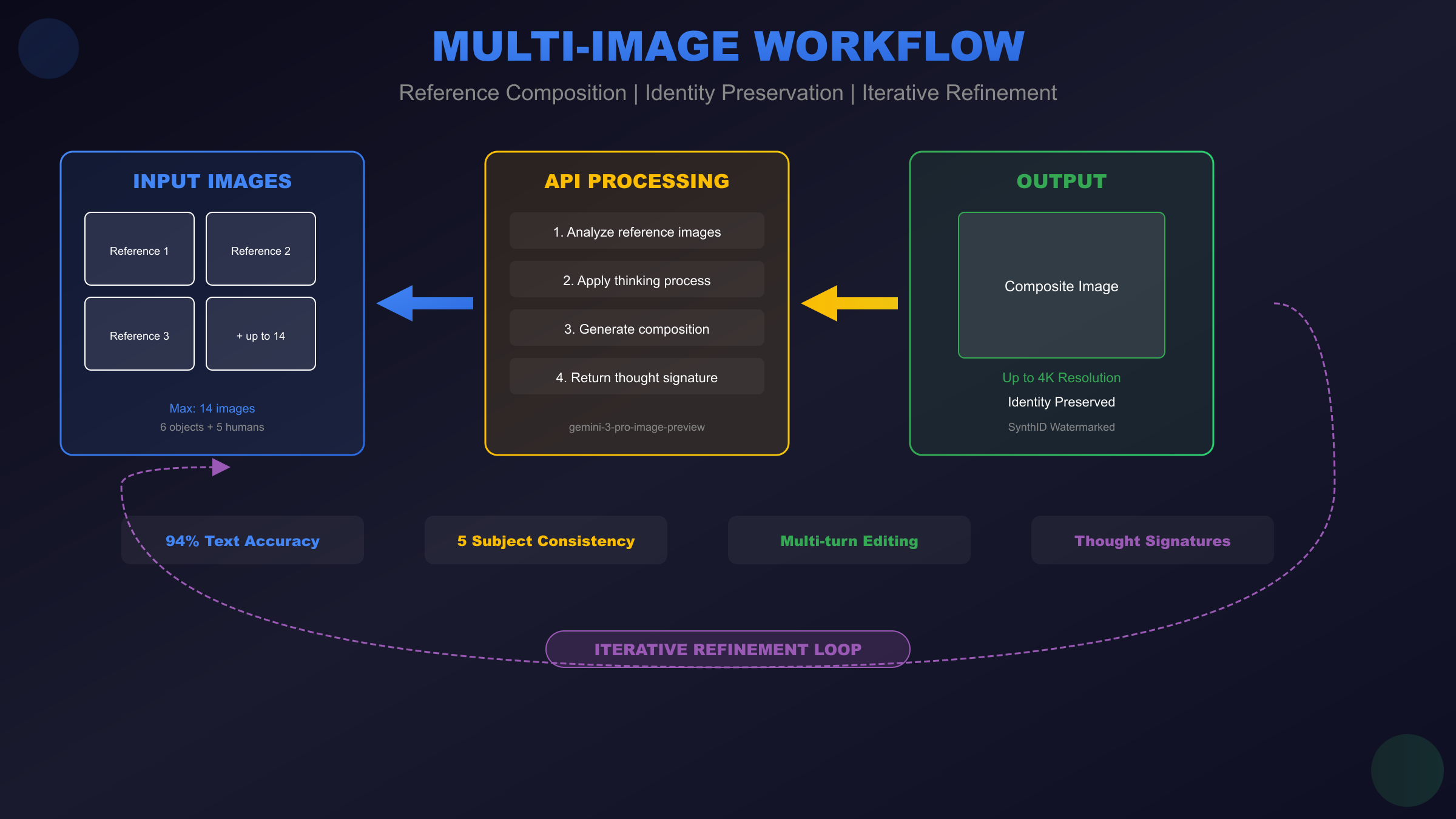
One of the API's most powerful features allows combining multiple reference images into coherent outputs. The model can process up to 14 input images—6 for objects and 5 for human subjects—while maintaining visual consistency and reasonable spatial relationships.
pythonimport base64
def load_image_as_base64(image_path: str) -> str:
"""Load an image file and return base64-encoded data."""
with open(image_path, "rb") as f:
return base64.standard_b64encode(f.read()).decode()
def composite_images(
prompt: str,
reference_images: list[str],
output_path: str
) -> bool:
"""
Generate an image combining multiple reference images.
reference_images: List of file paths to reference images
"""
# Build content parts with text and images
content_parts = [{"text": prompt}]
for img_path in reference_images:
image_data = load_image_as_base64(img_path)
content_parts.append({
"inline_data": {
"mime_type": "image/png",
"data": image_data
}
})
response = client.models.generate_content(
model="gemini-3-pro-image-preview",
contents=content_parts,
config=types.GenerateContentConfig(
response_modalities=['TEXT', 'IMAGE'],
image_config=types.ImageConfig(
aspect_ratio="16:9",
image_size="2K"
)
)
)
# Extract and save result
for part in response.candidates[0].content.parts:
if hasattr(part, 'inline_data'):
image_bytes = base64.b64decode(part.inline_data.data)
image = Image.open(BytesIO(image_bytes))
image.save(output_path)
return True
return False
# Example: Combine product and background references
composite_images(
prompt="Place the product from image 1 on the background scene from image 2, maintaining realistic lighting and scale",
reference_images=["product_photo.png", "studio_background.png"],
output_path="composite_result.png"
)
Identity Preservation Techniques
Maintaining consistent character appearance across multiple generated images enables use cases like marketing campaigns featuring the same persona, storyboard creation, or educational content with recurring characters. The API can preserve identity for up to 5 distinct human subjects simultaneously.
pythondef generate_character_series(
character_reference: str,
scene_prompts: list[str],
output_prefix: str
) -> list[str]:
"""
Generate multiple images featuring the same character.
Returns list of output file paths.
"""
character_data = load_image_as_base64(character_reference)
outputs = []
for i, scene in enumerate(scene_prompts):
prompt = f"Generate an image of the person from the reference photo: {scene}. Maintain exact facial features and characteristics."
content_parts = [
{"text": prompt},
{"inline_data": {"mime_type": "image/png", "data": character_data}}
]
response = client.models.generate_content(
model="gemini-3-pro-image-preview",
contents=content_parts,
config=types.GenerateContentConfig(
response_modalities=['TEXT', 'IMAGE'],
image_config=types.ImageConfig(aspect_ratio="16:9", image_size="2K")
)
)
output_path = f"{output_prefix}_{i}.png"
for part in response.candidates[0].content.parts:
if hasattr(part, 'inline_data'):
image_bytes = base64.b64decode(part.inline_data.data)
Image.open(BytesIO(image_bytes)).save(output_path)
outputs.append(output_path)
break
return outputs
Iterative Refinement with Thought Signatures
The Gemini 3 Pro Image API supports multi-turn conversations where each exchange builds upon previous context. This enables iterative refinement workflows—generating an initial image, requesting specific modifications, and progressively improving the result without starting over.
Thought signatures are encrypted tokens the API returns that encode the model's reasoning state. Including these signatures in subsequent requests maintains context continuity:
pythondef iterative_refinement_session():
"""Demonstrate multi-turn image refinement."""
# Initial generation
response = client.models.generate_content(
model="gemini-3-pro-image-preview",
contents="Create a logo for a tech company called 'NexGen Solutions' - modern, minimalist style",
config=types.GenerateContentConfig(
response_modalities=['TEXT', 'IMAGE'],
image_config=types.ImageConfig(aspect_ratio="1:1", image_size="2K")
)
)
# Extract thought signature for context preservation
thought_signature = None
for part in response.candidates[0].content.parts:
if hasattr(part, 'thought_signature'):
thought_signature = part.thought_signature
# Second turn - refine the result
refinement_contents = [
{"text": "Make the colors more vibrant and add a subtle gradient effect"}
]
if thought_signature:
refinement_contents.append({"thought_signature": thought_signature})
# Include the generated image for reference
for part in response.candidates[0].content.parts:
if hasattr(part, 'inline_data'):
refinement_contents.append({
"inline_data": {
"mime_type": part.inline_data.mime_type,
"data": part.inline_data.data
}
})
refined_response = client.models.generate_content(
model="gemini-3-pro-image-preview",
contents=refinement_contents,
config=types.GenerateContentConfig(
response_modalities=['TEXT', 'IMAGE'],
image_config=types.ImageConfig(aspect_ratio="1:1", image_size="2K")
)
)
return refined_response
Image Editing Capabilities
Beyond generation, the API supports sophisticated editing operations on existing images—style transfer, selective modifications, background replacement, and more:
pythondef edit_image(
source_image_path: str,
edit_instruction: str,
output_path: str
) -> bool:
"""Apply edits to an existing image based on text instructions."""
source_data = load_image_as_base64(source_image_path)
response = client.models.generate_content(
model="gemini-3-pro-image-preview",
contents=[
{"text": edit_instruction},
{"inline_data": {"mime_type": "image/png", "data": source_data}}
],
config=types.GenerateContentConfig(
response_modalities=['TEXT', 'IMAGE'],
image_config=types.ImageConfig(image_size="2K")
)
)
for part in response.candidates[0].content.parts:
if hasattr(part, 'inline_data'):
image_bytes = base64.b64decode(part.inline_data.data)
Image.open(BytesIO(image_bytes)).save(output_path)
return True
return False
# Example editing operations
edit_image("portrait.png", "Convert to black and white with high contrast", "portrait_bw.png")
edit_image("product.png", "Remove the background and replace with pure white", "product_clean.png")
edit_image("scene.png", "Add dramatic sunset lighting to the sky", "scene_sunset.png")
The editing capabilities shine particularly when combined with identity preservation—you can take a portrait, place the subject in different environments, adjust lighting conditions, and change clothing or accessories while maintaining perfect facial consistency. This workflow eliminates the need for multiple photoshoots or complex Photoshop compositing work that previously required specialized skills.
API Pricing and Cost Optimization
Understanding Gemini 3 Pro Image API pricing enables informed decisions about when to use this premium model versus alternatives. The pricing structure combines token-based costs for text processing with per-image costs for generation, creating a straightforward economic model once you understand the components.
Official Pricing Breakdown
Google structures Gemini 3 Pro Image pricing around output resolution, with text tokens priced separately:
| Cost Category | Rate | Notes |
|---|---|---|
| 1K/2K Image Output | $0.134 per image | Most common use case |
| 4K Image Output | $0.24 per image | ~80% premium for max resolution |
| Image Input | $0.0011 per image | Reference images for editing |
| Text Input | $2.00 per 1M tokens | Prompt text (typically negligible) |
| Text Output | $12.00 per 1M tokens | Description text returned |
For practical budgeting, image generation costs dominate. A typical prompt consumes perhaps 100 tokens ($0.0002), making the per-image rate effectively the total cost. Reference images for editing or composition add minimal expense at just over one-tenth of a cent each.
The resolution pricing differential deserves careful consideration. At $0.24 versus $0.134, 4K output costs 79% more than 2K while producing four times the pixels. For web applications where images are compressed and displayed at effectively 2K resolution anyway, the premium buys negligible visible improvement. Reserve 4K for genuine requirements like print production, large-format displays, or archival purposes.
Batch API: 50% Cost Reduction
Google's Batch API transforms economics for workloads tolerating asynchronous processing. By submitting requests for batch processing with up to 24-hour turnaround, you receive a straight 50% discount:
| Resolution | Standard Rate | Batch Rate | Savings |
|---|---|---|---|
| 1K/2K | $0.134 | $0.067 | 50% |
| 4K | $0.24 | $0.12 | 50% |
The batch model suits numerous real-world scenarios: overnight content generation for marketing teams who prep materials days ahead, bulk product catalog updates for e-commerce platforms, dataset creation for machine learning training, and any pipeline where immediate results aren't essential. The implementation requires minimal code changes—swap synchronous endpoints for batch submission endpoints, then poll for completion or configure webhook notifications.
Teams generating hundreds or thousands of monthly images routinely achieve 40-60% cost reductions through strategic batch utilization combined with resolution optimization. A workflow generating 1,000 2K images monthly costs $134 at standard rates but just $67 through batch processing—$804 annual savings from a simple workflow change.
Cost Comparison with Alternatives
How does Gemini 3 Pro Image pricing compare to competing services?
| Service | Per-Image Cost | Max Resolution | Text Accuracy |
|---|---|---|---|
| Gemini 3 Pro Image | $0.134-0.24 | 4K | ~94% |
| DALL-E 3 | $0.04-0.08 | 1024×1024 | ~70% |
| Midjourney | ~$0.06* | ~2K | ~71% |
| Imagen 4 | $0.06 | 4K | ~60% |
| Flux Pro | $0.05-0.10 | Various | ~65% |
*Midjourney pricing varies by subscription tier
Gemini 3 Pro Image commands premium pricing—roughly 2-4x competitors at comparable settings. This premium reflects specific capability advantages: industry-leading text rendering accuracy, multi-image composition supporting up to 14 references, identity preservation across subjects, and native 4K output. For applications requiring these specific capabilities, the premium delivers genuine value that alternative models cannot match.
For simpler use cases—basic image generation without text, single-subject compositions, or workflows where occasional text errors are acceptable—lower-cost alternatives may provide better value. The decision matrix depends on your specific requirements rather than raw price comparison.
Third-Party Access Options
Several aggregation services provide Gemini 3 Pro Image access at reduced rates through volume arrangements or simplified billing:
For developers seeking cost-effective access, platforms like laozhang.ai offer stable API access at approximately $0.05 per image—representing 60-70% savings versus official rates. These services prove particularly valuable for teams in regions with limited direct Google API availability, those preferring simplified billing without Google Cloud complexity, or developers seeking predictable per-image pricing without token math.
When evaluating third-party options, verify the provider offers genuine Gemini 3 Pro Image access (not older models marketed with similar names), check reliability track records, and understand data handling policies. Production workflows benefit from providers offering SLA guarantees and responsive support channels.
For detailed pricing analysis and free tier options, our Nano Banana Pro pricing guide provides comprehensive breakdowns.
Error Handling and Troubleshooting
Production deployments of the Gemini 3 Pro Image API require robust error handling to manage network issues, rate limits, content policy rejections, and the various edge cases that emerge at scale. Understanding common failure modes and implementing appropriate responses ensures reliable service even when individual requests fail.
Common Error Codes and Solutions
The API returns standard HTTP status codes with detailed error messages in the response body. Each error type requires specific handling:
400 Bad Request: Invalid request format or parameters. Common causes include mixing deprecated thinking_budget with new thinking_level parameter, malformed JSON in request body, invalid aspect ratio specifications, or attempting to use unsupported features. These errors indicate bugs in your code rather than transient failures—log the full error message and fix the underlying issue.
pythondef handle_api_error(error: Exception) -> str:
"""Parse and categorize API errors for appropriate handling."""
error_str = str(error)
if "400" in error_str:
if "thinking" in error_str.lower():
return "INVALID_PARAM: Don't mix thinking_level with thinking_budget"
return f"BAD_REQUEST: Check request format - {error_str}"
if "401" in error_str:
return "AUTH_FAILED: Verify API key is valid and has appropriate permissions"
if "403" in error_str:
return "FORBIDDEN: Content policy violation or API access restricted"
if "429" in error_str:
return "RATE_LIMIT: Implement backoff and retry"
if "500" in error_str or "503" in error_str:
return "SERVER_ERROR: Transient failure, retry with backoff"
return f"UNKNOWN_ERROR: {error_str}"
403 Forbidden: Either content policy violation or API access issues. If the error mentions safety or content policy, your prompt triggered safety filters—rephrase to avoid prohibited content categories. If the error mentions permissions, verify your API key has image generation enabled in Google AI Studio settings.
429 Rate Limited: Exceeded quota limits. Implement exponential backoff starting at 10 seconds, doubling with each retry up to a maximum of 5 minutes. For sustained rate limit issues, consider batch processing to spread load more evenly or upgrading quota allocations through Google Cloud Console.
Rate Limit Management
Google enforces several rate limit tiers based on account type and model:
| Account Type | Requests/Minute | Tokens/Minute | Daily Limit |
|---|---|---|---|
| Free Tier | 15 | 32,000 | 1,500 |
| Pay-as-you-go | 60 | 120,000 | Unlimited |
| Provisioned | Custom | Custom | Unlimited |
Free tier limits are generous for development but insufficient for production. The transition to pay-as-you-go removes daily limits while quadrupling per-minute throughput—essential for any application serving multiple users.
pythonimport time
from functools import wraps
def rate_limit_handler(max_retries: int = 5, base_delay: float = 10.0):
"""Decorator implementing exponential backoff for rate limits."""
def decorator(func):
@wraps(func)
def wrapper(*args, **kwargs):
last_exception = None
for attempt in range(max_retries):
try:
return func(*args, **kwargs)
except Exception as e:
if "429" not in str(e):
raise # Non-rate-limit error, propagate immediately
last_exception = e
delay = base_delay * (2 ** attempt)
delay = min(delay, 300) # Cap at 5 minutes
print(f"Rate limited, waiting {delay:.1f}s (attempt {attempt + 1}/{max_retries})")
time.sleep(delay)
raise last_exception
return wrapper
return decorator
@rate_limit_handler(max_retries=5)
def generate_with_retry(prompt: str) -> dict:
"""Generate image with automatic rate limit handling."""
return client.models.generate_content(
model="gemini-3-pro-image-preview",
contents=prompt,
config=types.GenerateContentConfig(
response_modalities=['TEXT', 'IMAGE']
)
)
Safety Filter Handling
The Gemini 3 Pro Image API applies content safety filters that may reject prompts involving violence, adult content, hate speech, or other policy violations. Unlike explicit error messages, safety filter activations sometimes return empty responses or generic errors.
When a prompt fails safety review, avoid simply retrying with the same content. Instead, analyze the prompt for potentially problematic elements and rephrase. Common triggers include explicit references to violence (even historical), certain medical imagery, and content that could be used for harassment or misinformation.
For legitimate use cases that occasionally trigger overzealous filters (like medical education content), consider implementing prompt preprocessing that adds clarifying context or reframes descriptions to emphasize educational intent.
Thought Signature Issues
Multi-turn conversations require careful thought signature management. The most common issues involve signature expiration (signatures become invalid after extended periods), mismatched signatures (using a signature from a different conversation context), and missing signatures in function calling workflows where they're strictly validated.
pythonclass ConversationManager:
"""Manage multi-turn conversations with proper signature handling."""
def __init__(self):
self.current_signature = None
self.conversation_history = []
def send_message(self, message: str, include_image: bool = False) -> dict:
"""Send message maintaining conversation context."""
contents = [{"text": message}]
# Include signature if we have one
if self.current_signature:
contents.append({"thought_signature": self.current_signature})
# Include previous image if editing
if include_image and self.conversation_history:
last_response = self.conversation_history[-1]
for part in last_response.candidates[0].content.parts:
if hasattr(part, 'inline_data'):
contents.append({
"inline_data": {
"mime_type": part.inline_data.mime_type,
"data": part.inline_data.data
}
})
response = client.models.generate_content(
model="gemini-3-pro-image-preview",
contents=contents,
config=types.GenerateContentConfig(
response_modalities=['TEXT', 'IMAGE']
)
)
# Extract new signature
for part in response.candidates[0].content.parts:
if hasattr(part, 'thought_signature'):
self.current_signature = part.thought_signature
self.conversation_history.append(response)
return response
def reset_conversation(self):
"""Start fresh conversation, clearing signature and history."""
self.current_signature = None
self.conversation_history = []
Integration Best Practices
Moving from prototype to production requires attention to architectural patterns, security considerations, and operational concerns that don't matter during initial development. These best practices emerge from real-world deployment experience and help avoid common pitfalls.
Production Deployment Architecture
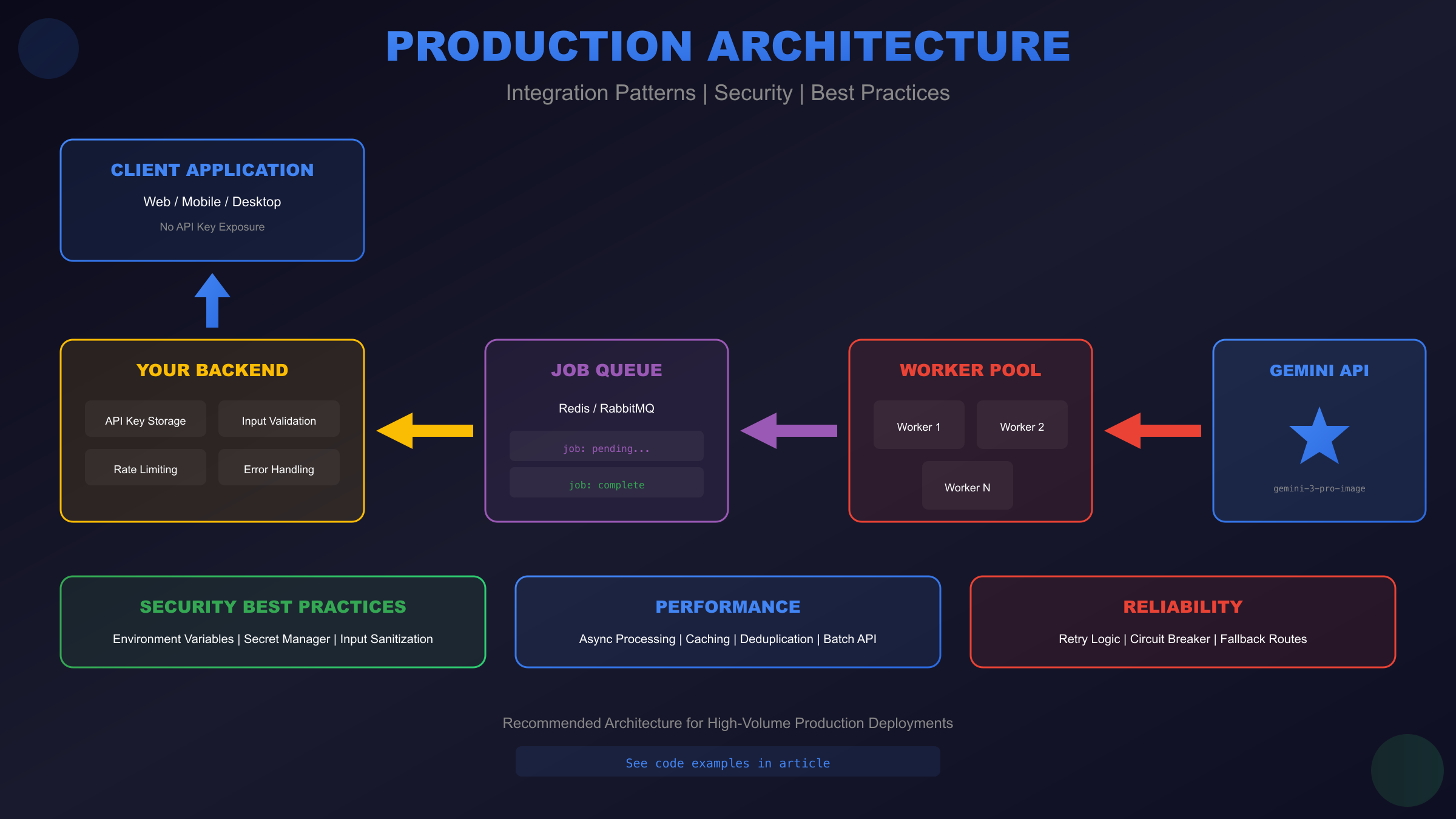
Design your integration with failure isolation and graceful degradation. The image generation service should run independently from core application logic, communicating through message queues or async job systems. This architecture prevents image generation failures from cascading into broader application outages.
pythonfrom redis import Redis
import json
import uuid
class ImageGenerationService:
"""Production-ready image generation with job queue."""
def __init__(self, redis_url: str):
self.redis = Redis.from_url(redis_url)
self.job_queue = "image_gen_jobs"
self.result_prefix = "image_result:"
def submit_job(self, prompt: str, config: dict) -> str:
"""Submit generation job, return job ID for polling."""
job_id = str(uuid.uuid4())
job_data = {
"id": job_id,
"prompt": prompt,
"config": config,
"status": "pending",
"created_at": time.time()
}
self.redis.lpush(self.job_queue, json.dumps(job_data))
return job_id
def get_result(self, job_id: str) -> dict:
"""Check job status and retrieve result if complete."""
result = self.redis.get(f"{self.result_prefix}{job_id}")
if result:
return json.loads(result)
return {"status": "pending"}
def process_jobs(self):
"""Worker process: pull jobs from queue and execute."""
while True:
job_data = self.redis.brpop(self.job_queue, timeout=30)
if not job_data:
continue
job = json.loads(job_data[1])
try:
result = self._generate_image(job["prompt"], job["config"])
result["status"] = "complete"
except Exception as e:
result = {"status": "failed", "error": str(e)}
self.redis.setex(
f"{self.result_prefix}{job['id']}",
3600, # 1 hour expiry
json.dumps(result)
)
Caching and Deduplication
Identical prompts produce different images each generation—which is usually desirable but wastes resources when users accidentally submit duplicate requests. Implement request deduplication using prompt hashing:
pythonimport hashlib
class RequestDeduplicator:
"""Prevent duplicate requests within short time windows."""
def __init__(self, redis: Redis, window_seconds: int = 60):
self.redis = redis
self.window = window_seconds
def get_request_hash(self, prompt: str, config: dict) -> str:
"""Generate deterministic hash for request."""
content = f"{prompt}|{json.dumps(config, sort_keys=True)}"
return hashlib.sha256(content.encode()).hexdigest()[:16]
def is_duplicate(self, prompt: str, config: dict) -> bool:
"""Check if identical request was made recently."""
request_hash = self.get_request_hash(prompt, config)
key = f"request:{request_hash}"
if self.redis.exists(key):
return True
self.redis.setex(key, self.window, "1")
return False
For workflows where caching generated images is appropriate (like static marketing content), implement result caching keyed on prompt content. This requires careful consideration of when cached results remain valid—user-specific content or time-sensitive prompts shouldn't be cached.
Security Best Practices
Never expose your API key in client-side code. All Gemini API requests should route through your backend, which holds the API key securely. Environment variables work for simple deployments; larger systems should use secrets management services like Google Secret Manager, AWS Secrets Manager, or HashiCorp Vault.
Validate and sanitize user inputs before incorporating them into prompts. While the API itself handles many injection attempts, implementing input validation prevents users from manipulating prompts in unintended ways or submitting content designed to extract policy-violating outputs.
For users in regions with connectivity challenges or those preferring simplified billing, services like laozhang.ai provide stable alternative access with enterprise-grade security practices—worth evaluating when direct Google API access proves unreliable.
For free tier access methods and additional integration patterns, see our Gemini 3 Pro free API guide.
Conclusion: Getting Started with Gemini 3 Pro Image API
The Gemini 3 Pro Image API represents a significant advancement in accessible image generation technology, combining Google DeepMind's research leadership with practical developer tooling. The capabilities we've explored throughout this guide—94% text rendering accuracy, 4K resolution output, multi-image composition with up to 14 references, identity preservation across subjects, and iterative refinement through thought signatures—position this API as a genuine production-ready tool rather than an experimental curiosity.
The path from initial API key to production deployment follows clear steps. Authentication through Google AI Studio provides immediate access with generous free-tier quotas for development and testing. The official Python and JavaScript SDKs handle the complexity of request formatting, response parsing, and authentication, letting you focus on application logic rather than API plumbing. Working code examples throughout this guide provide copy-paste starting points that handle common edge cases and production requirements.
Pricing considerations favor strategic usage patterns. Standard rates of $0.134 per 2K image and $0.24 per 4K image represent premium positioning, but the Batch API's 50% discount transforms economics for workflows tolerating asynchronous processing. Third-party aggregators offer additional savings for teams prioritizing cost efficiency over direct Google access. The decision matrix ultimately depends on your specific requirements: text accuracy needs, resolution requirements, and whether the advanced features justify the premium over lower-cost alternatives.
Quick Start Checklist
For developers ready to begin integration immediately, this checklist summarizes the essential steps:
| Step | Action | Resource |
|---|---|---|
| 1 | Obtain API key | Google AI Studio |
| 2 | Install SDK | pip install google-genai or npm install @google/genai |
| 3 | Set environment variable | export GEMINI_API_KEY=your_key |
| 4 | Test connectivity | Run basic text generation request |
| 5 | Generate first image | Use examples from this guide |
| 6 | Implement error handling | Add rate limit and retry logic |
| 7 | Plan for production | Consider caching, queuing, monitoring |
The Gemini 3 Pro Image API continues evolving—Google regularly releases updates improving quality, expanding capabilities, and adjusting pricing. The "preview" designation indicates active development, making it worthwhile to monitor official documentation for changes. Subscribe to Google AI's developer updates and test new capabilities as they become available.
Whether you're building marketing automation tools, e-commerce product visualization systems, content creation platforms, or experimental creative applications, the Gemini 3 Pro Image API provides the foundation for sophisticated image generation workflows. The combination of capability depth, integration simplicity, and Google's infrastructure reliability makes it a compelling choice for serious image generation applications.
Start with free tier experimentation, validate that the capabilities match your requirements, then scale to production with confidence that the API will perform reliably at whatever volume your application demands.