Gemini 3.0 Ultra Free Tier Limits: Complete 2025 Guide (What Actually Exists)
Comprehensive guide to Gemini 3.0 Ultra free tier limits in 2025. Learn about actual model availability, API rate limits, December 2025 changes, Google AI subscription tiers, and practical workarounds for developers.
Nano Banana Pro
4K图像官方2折Google Gemini 3 Pro Image · AI图像生成
已服务 10万+ 开发者
If you've been searching for Gemini 3.0 Ultra free tier limits, you've likely encountered a frustrating maze of conflicting information, outdated documentation, and confusing terminology. Here's the truth that most articles won't tell you upfront: "Gemini 3.0 Ultra" as a single product doesn't actually exist. What does exist is a combination of Google's latest Gemini 3 Pro model and the Google AI Ultra subscription tier, each with their own distinct limitations and access requirements. Understanding this distinction is crucial before you can make sense of any rate limits or pricing discussions.
This comprehensive guide cuts through the confusion to explain exactly what free tier access you can get in December 2025, what changed recently, and how to maximize your usage without paying a premium subscription fee. Whether you're a developer building applications, a researcher running experiments, or simply someone trying to use Google's AI capabilities without breaking the bank, this article provides the clarity you need.
The stakes are real for anyone building on Gemini's platform. The December 2025 changes caught thousands of developers off guard, breaking production applications overnight. Understanding not just the current limits but also the trajectory of Google's free tier policies helps you make informed decisions about where to invest your development time. This guide synthesizes information from official documentation, API behavior analysis, and community experiences to give you the most complete picture available anywhere.
Understanding the Gemini Naming Confusion
The search term "Gemini 3.0 Ultra" reflects a common misunderstanding about Google's AI product naming that has confused developers and users alike since the Gemini family launched. To understand what free tier limits actually apply to your situation, you first need to understand how Google structures its AI offerings across different dimensions.
Gemini models refer to the actual AI models themselves—the underlying technology that processes your prompts and generates responses. The current lineup includes Gemini 3 Pro (the latest flagship), Gemini 2.5 Pro, Gemini 2.5 Flash, and their various sub-variants. Each model has different capabilities, context windows, and performance characteristics. When people talk about "Gemini Ultra," they're often conflating this with the original Gemini Ultra 1.0, which was Google's first flagship model but has since been superseded by newer versions.
Google AI subscription tiers, on the other hand, determine your level of access to these models. Google offers three tiers: Free, Google AI Pro ($19.99/month), and Google AI Ultra ($249.99/month). The "Ultra" in this context refers to the subscription level, not a specific model. This naming overlap with the deprecated Gemini Ultra 1.0 model creates significant confusion in search results and discussions.
The practical implication is significant: when you search for "Gemini 3.0 Ultra free tier limits," you're actually asking about two separate things. First, what are the free tier limits for accessing Gemini 3 Pro (the latest model)? Second, what do you get without paying for the Google AI Ultra subscription? The answers to these questions are quite different, and understanding both is essential for making informed decisions about your AI usage strategy.
For developers specifically, there's an additional layer: the Gemini API has its own tier structure (Free and Pay-as-you-go) that's separate from the consumer-facing Google AI subscriptions. The API free tier has different limits than the Gemini app free tier, and both have undergone dramatic changes in recent months. This guide covers all these scenarios comprehensively.
Current Gemini Model Lineup
Before diving into specific limits, it's essential to understand what models are actually available and their relative positioning in Google's AI hierarchy. The Gemini family has expanded significantly since its initial launch, and each model serves different use cases with varying free tier availability.
Gemini 3 Pro represents Google's most advanced publicly available model as of late 2025. Released in preview during November 2025, it delivers state-of-the-art reasoning capabilities and includes access to Gemini 3 Deep Think, an enhanced reasoning mode designed for complex problem-solving. However, Gemini 3 Pro is notably absent from the free tier—it's only accessible to Google AI Ultra subscribers ($249.99/month) or through the paid API tier. This makes it effectively inaccessible for free tier users, which is a crucial point that many articles gloss over.
Gemini 2.5 Pro was previously the flagship model and offered the best balance of capability and availability. With a massive 1 million token context window, it excels at processing long documents, maintaining extended conversations, and handling complex analytical tasks. Until December 2025, this model was available on the API free tier with limited requests per day. However, Google's recent changes have removed Gemini 2.5 Pro from the free tier entirely for many users, making this information outdated in most existing guides.
Gemini 2.5 Flash is designed as a faster, more cost-effective alternative to the Pro models. It maintains strong performance for most common tasks while offering significantly lower latency and, historically, more generous free tier limits. The Flash variant became the go-to choice for developers who needed reasonable AI capabilities without paying for premium access. However, even Flash limits have been dramatically reduced in recent changes.
Gemini 2.5 Flash-Lite offers the most economical option in terms of both cost and resource usage. It's designed for high-volume, lower-complexity tasks where speed matters more than maximum capability. This model retains the most generous free tier limits among the current offerings.
| Model | Context Window | Free Tier Status | Best For |
|---|---|---|---|
| Gemini 3 Pro | 1M tokens | Not available | Complex reasoning, Deep Think |
| Gemini 2.5 Pro | 1M tokens | Removed (Dec 2025) | Long documents, analysis |
| Gemini 2.5 Flash | 1M tokens | Severely limited | General tasks, speed |
| Gemini 2.5 Flash-Lite | 1M tokens | Available | High-volume, simple tasks |
Understanding this hierarchy helps explain why free tier users face increasingly limited options. Google has systematically moved its most capable models behind paid access while reducing limits on the remaining free options. This trend reflects both the high computational costs of running these models and Google's strategy to convert free users into paying customers.
The computational economics underlying these decisions are worth understanding. Running a single Gemini 2.5 Pro request costs Google meaningful compute resources—estimates suggest between $0.001 and $0.01 per request depending on token count and complexity. With millions of free tier users making hundreds of millions of requests monthly, even small per-request costs add up to substantial infrastructure expenses. Google's free tier reductions reflect an attempt to control these costs while maintaining enough free access to drive adoption. The balance they're striking appears to favor acquisition (getting people to try Gemini) over retention (letting them use it extensively for free).
The capabilities gap between models is substantial. Gemini 3 Pro with Deep Think can handle multi-step reasoning problems that would stump the Flash variants. For tasks like complex code generation, academic research, or nuanced content creation, the free tier options may not deliver the quality you need. This reality check is important before you invest significant time building applications on free tier access that may not meet your actual requirements.
Free Tier Limits: Complete Breakdown
This section provides the most comprehensive and up-to-date breakdown of Gemini free tier limits available anywhere. The limits are presented across three distinct access methods: the Gemini API (for developers), the Gemini App (consumer interface), and the Gemini CLI (command-line interface for developers).
Gemini API Free Tier Limits
The API free tier is what most developers encounter when building applications. Rate limits are measured across three dimensions that operate independently—exceeding any single limit triggers rate limiting regardless of the others.
Requests Per Minute (RPM) determines how many API calls you can make in any 60-second window. For most free tier models, this is set at an extremely restrictive level that makes real-time applications essentially impossible. Tokens Per Minute (TPM) limits the total amount of text you can process per minute, combining both input and output tokens. Requests Per Day (RPD) caps your total daily usage and resets at midnight Pacific Time.
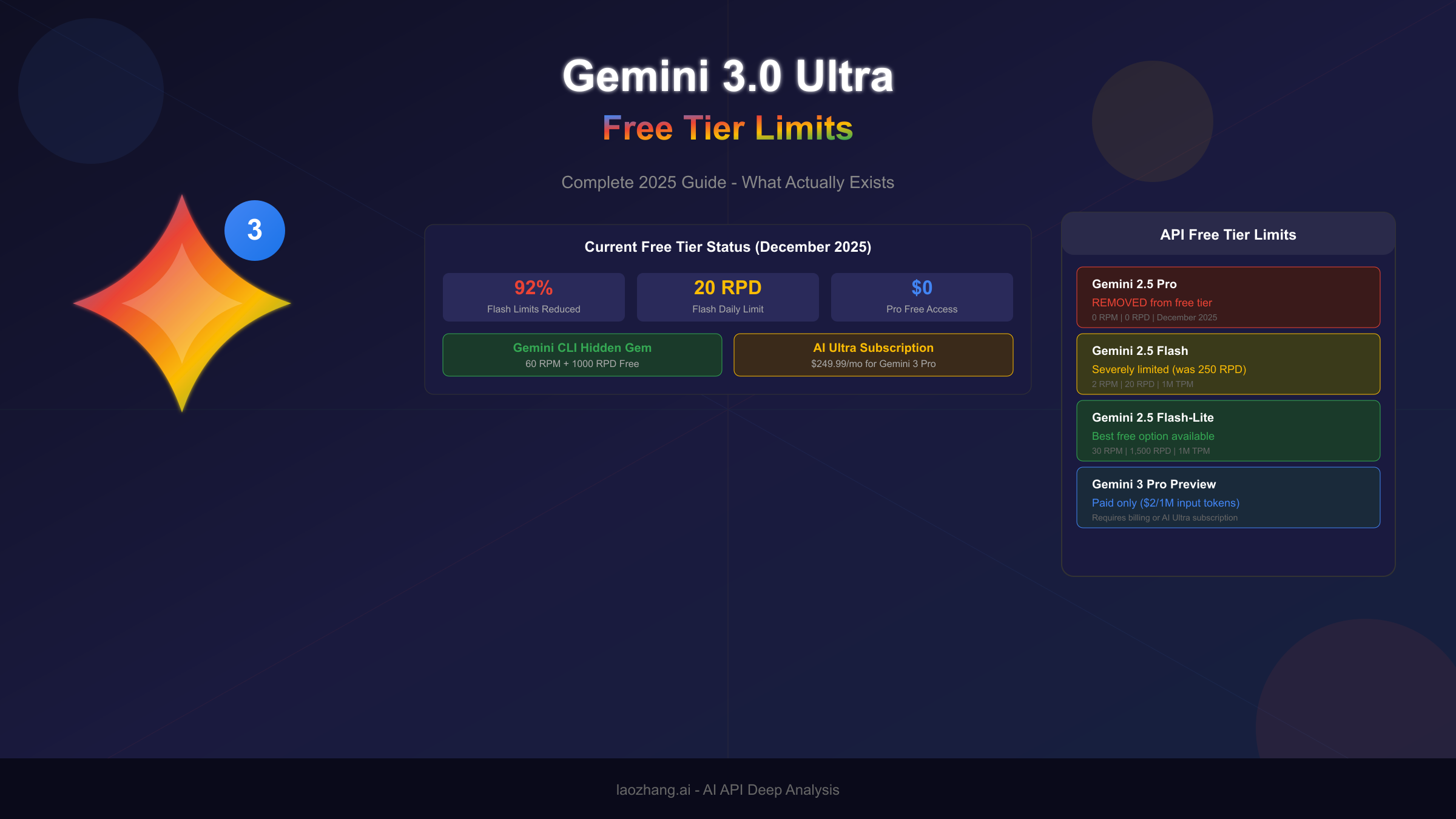
| Model | RPM | TPM | RPD | Notes |
|---|---|---|---|---|
| Gemini 2.5 Pro | 0 | 0 | 0 | Removed from free tier |
| Gemini 2.5 Flash | 2 | 1,000,000 | 20 | Reduced 92% in Dec 2025 |
| Gemini 2.5 Flash-Lite | 30 | 1,000,000 | 1,500 | Most generous option |
| Gemini 2.0 Flash | 10 | 1,000,000 | 1,000 | Legacy model |
| Gemini 3 Pro Preview | 0 | 0 | 0 | Paid only |
The practical implications of these limits are severe. With Gemini 2.5 Flash at just 2 RPM and 20 RPD, you can make one request every 30 seconds and only 20 total requests per day. This makes the free tier unsuitable for any production application or even moderate testing. The only viable free option for sustained development work is Gemini 2.5 Flash-Lite, which offers 30 RPM and 1,500 RPD—sufficient for basic prototyping and learning.
Critical Warning: When you enable billing and upgrade to the paid tier, your free tier access is completely removed. Every API call becomes billable from that point forward. There is no hybrid option where you get free requests up to a limit and then pay for overages.
Gemini App Free Tier Limits
For users accessing Gemini through the consumer web interface or mobile apps rather than the API, a different set of limits applies. These limits are less precisely documented and more prone to fluctuation based on system demand.
The Gemini App free tier initially provided access to "up to 5 prompts per day" when Gemini 3 Pro launched. However, Google quickly reduced this to a dynamic "basic access" tier where daily limits fluctuate based on overall system demand. On high-traffic days, free users might find themselves limited to just 2-3 prompts, while quieter periods might allow slightly more.
Image generation through Nano Banana Pro (Gemini's image model) started at 3 images per day for free users but was reduced to 2 images per day. Google has explicitly stated that even this limit "may change frequently" due to high demand, making it unreliable for any workflow that depends on consistent access.
The distinction between "basic access" and full access is important. Free tier users don't get access to Gemini 3 Pro's full capabilities—they're often served responses from less capable models even when the interface suggests otherwise. Features like Deep Think, extended context processing, and certain multimodal capabilities are reserved for paid subscribers.
Gemini CLI Free Tier: The Hidden Gem
Perhaps the most underreported free tier option is the Gemini CLI (Command Line Interface), which Google launched with surprisingly generous limits that far exceed the standard API free tier. This option deserves special attention because it represents the best free access currently available.
By logging in with a personal Google account, you receive a free Gemini Code Assist license that provides access to Gemini 2.5 Pro with its full 1 million token context window. The limits are dramatically more generous than the standard API:
- 60 requests per minute (compared to 2 RPM for standard API)
- 1,000 requests per day (compared to 20 RPD for standard API)
- Access to both Gemini 2.5 Pro and Flash models
These limits make Gemini CLI viable for actual development work, not just casual experimentation. The catch is that the free tier uses a blend of Gemini 2.5 Pro and Flash models based on demand, so you don't have guaranteed access to Pro for every request. However, for developers who can work within a command-line interface, this represents substantially better value than the standard API free tier.
The Gemini CLI is particularly useful for coding assistance, as it's designed to integrate with development workflows. If your primary use case is programming help rather than building applications that call the API, this might be your best option for free access to capable Gemini models.
The December 2025 Changes Explained
The first week of December 2025 marked a watershed moment for Gemini free tier users. Google implemented sweeping changes to its API rate limits without advance warning, leaving developers worldwide scrambling to understand what happened and adapt their applications. Understanding these changes is essential for anyone planning to use Gemini's free tier going forward.

The most dramatic change affected Gemini 2.5 Flash, the workhorse model that many developers relied upon for free tier access. Daily request limits were slashed by approximately 92%—from around 250 requests per day to just 20. Developers who had built applications around the previous limits woke up on December 6, 2025, to a flood of 429 "quota exceeded" errors with no explanation or transition period.
Gemini 2.5 Pro faced an even more severe fate: complete removal from the free tier for many accounts. Where developers previously enjoyed 25 requests per day with the Pro model, they now found zero free allocation. The model simply disappeared from free tier availability in Google AI Studio dashboards, with no announcement explaining the change.
Google's official explanation, when it eventually came, was characteristically vague. The company cited "high demand" and the need to "maintain service quality" for paying customers. This framing suggests that free tier usage was straining infrastructure to the point where it affected the paid user experience—a plausible explanation given the massive adoption of Gemini models throughout 2025.
The developer community reaction was swift and largely negative. Forums and social media filled with reports of broken applications, failed automated workflows, and frustration at the lack of communication. Many developers had built production systems on the assumption that free tier limits, while restrictive, would remain stable. The sudden change violated this implicit contract and raised concerns about Google's reliability as an AI platform provider.
Several patterns emerged from the community response that highlight the practical impact of these changes. Developers building AI-powered tools for personal use found their projects suddenly non-functional. Educational platforms that relied on free tier access for student projects had to scramble for alternatives or suspend features. Startups that had launched with free tier access as part of their MVP strategy faced unexpected cost pressures.
The timing of these changes is notable. Coming just weeks after the Gemini 3 Pro launch, the free tier restrictions appear designed to funnel users toward paid subscriptions. The message is clear: Google wants to monetize its AI capabilities more aggressively, and the generous free tiers that helped build initial adoption are being systematically reduced.
For developers and users planning their AI strategy, the December 2025 changes carry an important lesson: free tier limits should be treated as temporary promotional offers rather than reliable baselines. Building applications or workflows that depend on specific free tier allocations carries significant risk, as Google has demonstrated willingness to make dramatic changes without notice. This reality should factor into decisions about whether to invest development time in free tier access or to budget for paid API usage from the start.
The changes also highlight a broader industry pattern. OpenAI, Anthropic, and other AI providers have followed similar trajectories—generous free tiers during the adoption phase followed by progressive restrictions as usage scales. The pattern suggests that today's free tier limits, whatever they are, will likely be reduced further in the future. Developers who want to build sustainable applications should either plan for eventual paid access or architect their systems to be provider-agnostic from the beginning. Multi-provider strategies that can switch between Gemini, Claude, GPT-4, and other models provide insurance against any single provider's policy changes.
Google AI Subscription Tiers Explained
Understanding the full spectrum of Google's AI subscription options helps contextualize what you're missing on the free tier and whether upgrading makes sense for your needs. Google currently offers three distinct subscription tiers, each targeting different user profiles and use cases.
The Free Tier serves as an introduction to Google's AI capabilities but should be understood as a trial experience rather than a sustainable access method. Free users receive basic access to Gemini models through the Gemini app with dynamic, demand-based daily limits. As discussed earlier, these limits can fluctuate significantly and have been trending downward. The free tier also includes access to Google AI Studio for API experimentation, though with the severe rate limits documented above. Importantly, content generated on the free tier may be used by Google to improve their products—a consideration for users working with sensitive or proprietary information.
Google AI Pro at $19.99 per month represents the entry point for serious users who need reliable access. Subscribers receive up to 100 prompts per day in the Gemini app, access to Gemini 2.5 Pro's full capabilities, and 100 images per day through image generation features. The subscription includes 2TB of Google storage across Drive, Gmail, and Photos, adding value for users already in the Google ecosystem. For developers, AI Pro provides 5x higher limits in tools like Jules (Google's AI coding assistant) compared to free users, making it viable for daily coding workflows.
Google AI Ultra at $249.99 per month targets power users and professionals who need maximum capability and the highest limits available. Ultra subscribers get access to Gemini 3 Pro with Deep Think, up to 500 prompts per day in the Gemini app, and 1,000 images per day for generation tasks. The subscription includes 30TB of storage, YouTube Premium, and access to Google's most advanced features like video generation with Veo 3, agent capabilities, and priority access to new features as they launch. The Jules coding assistant comes with 20x higher limits for intensive multi-agent workflows.
| Feature | Free | AI Pro ($19.99/mo) | AI Ultra ($249.99/mo) |
|---|---|---|---|
| Gemini App Prompts | Dynamic (2-5/day) | 100/day | 500/day |
| Image Generation | 2/day | 100/day | 1,000/day |
| Gemini 3 Pro Access | No | No | Yes |
| Deep Think | No | No | Yes |
| Storage | 15GB | 2TB | 30TB |
| API Rate Limits | Free tier | Standard paid | Highest |
The pricing structure reveals Google's strategy: the jump from free to Pro ($240/year) is relatively modest for users who need consistent access, but the leap to Ultra ($3,000/year) positions the top tier firmly in professional territory. This tiering effectively segments the market, pushing casual users toward Pro while reserving the most capable features for high-value customers willing to pay premium prices.
The value proposition at each tier deserves closer examination. For the free tier, you're essentially getting a product demo—enough to evaluate capabilities and build basic prototypes, but not enough for sustained work. The limitations are intentionally frustrating to encourage upgrades. At the Pro level, you're paying roughly $0.66/day for access that eliminates most casual usage frustrations. The 100 daily prompts cover typical individual workflows, and the 2TB storage adds meaningful value if you're already using Google's ecosystem. At the Ultra level, the math becomes more complex—you're paying $8.33/day for access to Gemini 3 Pro's advanced capabilities, which is either excessive or reasonable depending entirely on whether you actually need those specific features. For someone regularly using Deep Think for complex problem-solving or generating professional video content with Veo 3, the subscription may well pay for itself. For someone who just wants more quota, it's likely overkill.
For most individual developers and small teams, Google AI Pro represents the best value proposition. The 100 prompts per day and enhanced API limits are sufficient for most development workflows, and the storage benefits add practical value. Google AI Ultra makes sense primarily for professional content creators, researchers with intensive workloads, or enterprises that need access to Gemini 3 Pro's advanced reasoning capabilities.
Practical Workarounds for Free Tier Users
Despite the increasingly restrictive free tier limits, developers have discovered several strategies to maximize their usage and work around the constraints. These approaches won't give you unlimited access, but they can significantly extend what you can accomplish without paying for a subscription.
Request batching is the most effective strategy for maximizing your limited daily requests. Instead of making multiple API calls with simple prompts, structure your requests to accomplish multiple goals in a single call. For example, rather than asking "What is X?" followed by "Explain Y," combine these into a single comprehensive prompt: "Explain X, Y, and their relationship, providing examples for each." This approach is particularly effective with Gemini's large context window, which allows you to include substantial input in a single request.
The key to effective batching lies in understanding how Gemini models process complex prompts. Unlike simpler language models that struggle with multi-part requests, Gemini can maintain coherence across extended outputs. You can ask for multiple code examples, request analysis across several dimensions, or combine translation, summarization, and analysis in a single request. The 1 million token context window means you can include extensive source material—entire codebases, multiple documents, or lengthy conversation histories—without splitting across multiple calls. Developers who master this batching approach often reduce their API calls by 50-70% while actually improving result quality through better context provision.
Implementing a robust caching layer can dramatically reduce your API usage. Before making any API call, check if you've previously received a response for an identical or semantically similar prompt. Store responses locally with reasonable TTL (time-to-live) values appropriate for your use case. For frequently accessed information that doesn't change often, aggressive caching can reduce your API calls by 60-80%. Consider using semantic similarity matching rather than exact string matching to catch variations of the same question.
Building an effective cache requires thoughtful architecture. At minimum, implement a key-value store using the prompt hash as the key and the full response as the value. For more sophisticated applications, consider embedding-based similarity search that can retrieve cached responses for semantically similar queries. Redis, SQLite, or even simple JSON files can serve as cache backends depending on your scale requirements. The cache invalidation strategy matters too—set shorter TTLs (hours) for dynamic content and longer TTLs (days or weeks) for stable information like documentation or factual knowledge. Some developers implement tiered caching with memory caches for hot data and disk caches for the long tail, achieving near-instant responses for common queries while preserving API quota for novel requests.
Model selection optimization means choosing the most cost-effective model for each task rather than defaulting to the most capable option. Gemini 2.5 Flash-Lite with its 30 RPM and 1,500 RPD limits is perfectly adequate for many tasks: simple question-answering, basic text transformation, classification, and summarization. Reserve your limited Flash or Pro requests for tasks that genuinely require their enhanced capabilities, such as complex reasoning, nuanced content generation, or handling longer context.
The Gemini CLI approach mentioned earlier deserves emphasis as a practical workaround. If your use case involves coding assistance, using the CLI instead of the API gives you access to dramatically better limits (60 RPM, 1,000 RPD) at no cost. Many developers have restructured their workflows to leverage this option, treating the CLI as their primary Gemini interface and falling back to the API only when programmatic access is strictly necessary.
Consider time-based request distribution to work within daily limits. If you have 20 requests per day, plan your usage to spread them across your work sessions rather than exhausting them in a single burst. Tools like rate limiting middleware can help enforce this discipline programmatically, preventing accidental quota exhaustion early in the day.
Error handling and retry logic become essential when working with tight limits. Implement exponential backoff for 429 (rate limit) errors, starting with a 1-second delay and doubling with each retry up to a maximum. Log your request patterns to identify when you're approaching limits, and build notification systems to alert you before you hit the wall. This proactive monitoring prevents the frustrating experience of running out of quota at critical moments.
Beyond basic retry logic, consider implementing a request queue system that manages API calls across your application. The queue can enforce rate limits proactively, spacing requests to stay within limits rather than reacting to errors after the fact. It can also prioritize critical requests over background tasks, ensuring that user-facing operations get quota preference when limits are tight. For applications with multiple users, the queue can implement fair sharing to prevent any single user from monopolizing the API quota. This architectural approach transforms rate limiting from a reactive problem into a proactive resource management strategy.
Finally, consider multi-provider strategies that don't rely solely on Gemini. Many tasks can be accomplished using multiple AI services, with different providers handling different parts of your workflow. This diversification protects against service disruptions and allows you to leverage free tiers across multiple platforms rather than depending entirely on one.
When to Upgrade: A Decision Framework
The decision to upgrade from free tier to paid access involves weighing immediate costs against long-term value, and this calculation differs significantly based on your specific use case. This section provides a framework for making this decision intelligently.
Start by quantifying your actual usage needs. Track your API calls for at least a week under normal working conditions, noting both the volume and timing of requests. Many users overestimate their needs initially and could manage with careful optimization of free tier limits. Conversely, others underestimate and waste time fighting constraints that a modest subscription would eliminate. Data beats intuition here.
Create a simple tracking system that logs every API call with its timestamp, token count, model used, and purpose category. After a week of normal usage, analyze the patterns: How many calls do you make on busy versus quiet days? What percentage could have been cached? Which calls genuinely required Pro-level capabilities versus which could have used Flash-Lite? This analysis often reveals surprising optimization opportunities that make free tier viable, or conversely, demonstrates clearly that paid access is the rational choice. The goal isn't to minimize costs at all expenses—it's to make an informed decision based on actual data rather than assumptions.
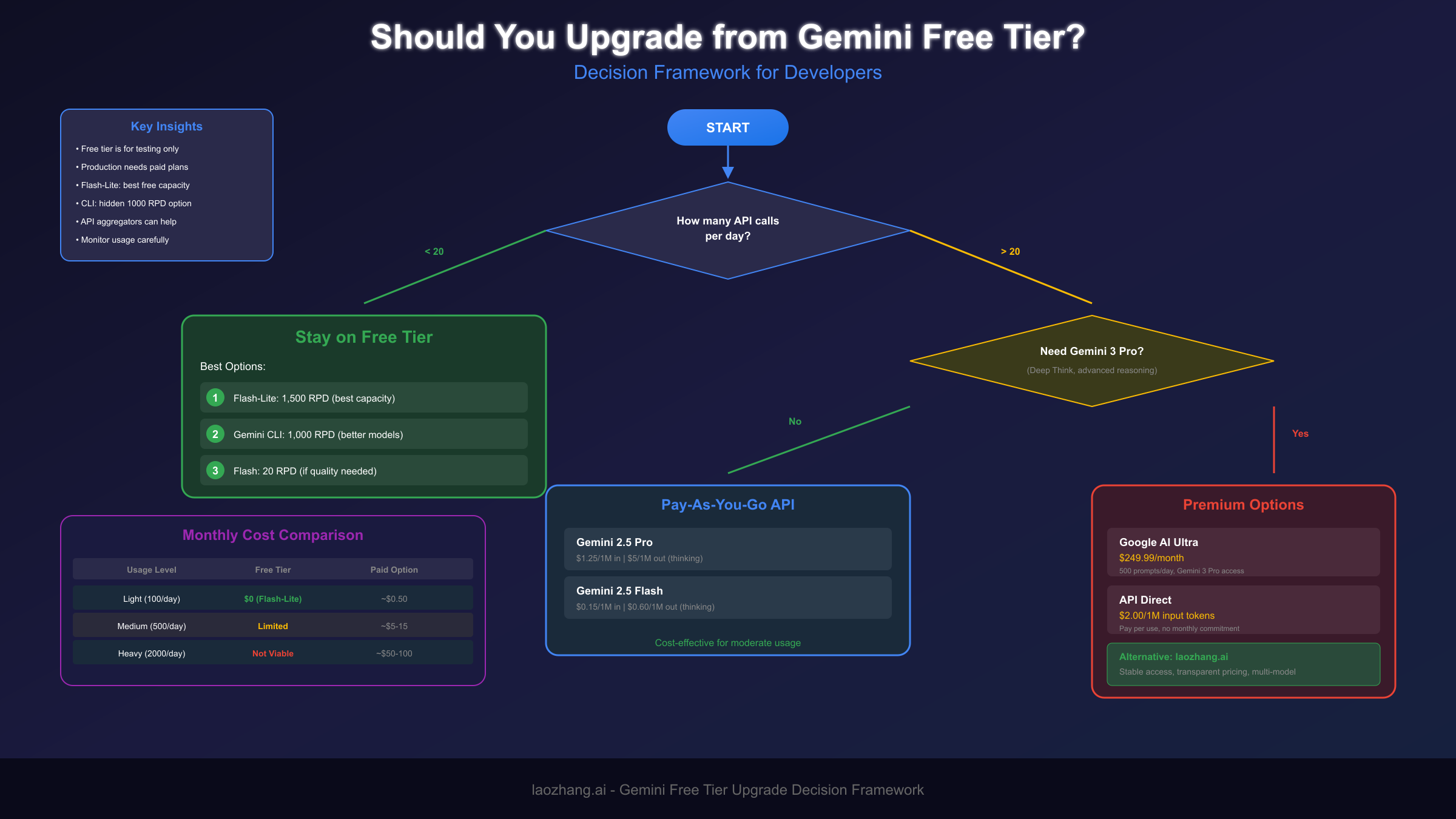
Consider the cost of your time when calculating whether free tier friction is worth tolerating. If you're a professional developer earning $50-100+ per hour, spending 30 minutes daily working around rate limits costs more than a Pro subscription would. The calculation changes for students, hobbyists, or researchers with limited budgets, where time is more available than money. Be honest about which category you fall into.
Reliability requirements should heavily influence your decision. If you're building anything that users depend on—even a personal project you use daily—the unpredictability of free tier limits introduces unacceptable risk. The December 2025 changes demonstrated that Google can and will modify limits without warning. Paid tiers, while not immune to changes, provide more stable baselines that allow for planning.
For developers facing budget constraints, API proxy services offer an interesting middle ground. Services like laozhang.ai provide access to multiple AI models including Gemini through a unified API, often at lower effective costs than direct API access. These services aggregate demand across many users, enabling better pricing while providing stable access that doesn't depend on any single provider's free tier policies. This approach is particularly valuable for developers who need to use multiple AI services or who want protection against rate limit changes.
The production vs. experimentation distinction matters significantly. Free tier access remains valuable for learning, prototyping, and testing concepts before committing to development. But the moment you're building something meant for regular use, the calculus shifts toward paid access. The risks of building on unstable foundations outweigh the short-term savings.
Consider the feature access question separately from volume. Some capabilities—Gemini 3 Pro, Deep Think, advanced multimodal features—simply aren't available on free tiers at any volume. If your use case genuinely requires these capabilities, free tier limits are irrelevant; you need to pay regardless. Clarify whether you need more volume or different capabilities.
For teams and organizations, predictable costs often matter more than absolute cost minimization. A $240/year Pro subscription or even $3,000/year Ultra subscription is a rounding error in most professional contexts. What matters is having reliable access that doesn't require constant monitoring and workaround implementation. The productivity cost of uncertainty typically exceeds subscription costs for professional use.
Consider the long-term trajectory of your project when making this decision. If you're building something you expect to grow, starting with paid access from the beginning avoids the disruption of migrating later. The architecture decisions you make during early development often become locked in—building on free tier assumptions and then discovering you need to restructure for paid access can be more expensive than paying from day one. For prototypes and experiments that might not proceed, free tier makes sense; for anything with production ambitions, factor paid access into your planning from the start.
API Integration Best Practices
Regardless of whether you're using free or paid access, implementing robust API integration practices prevents common problems and maximizes the value you get from your Gemini allocation. These practices become especially critical when working with limited quotas.
Comprehensive error handling is non-negotiable. Your code should gracefully handle 429 (rate limit exceeded), 500 (server error), 503 (service unavailable), and timeout errors. Each error type requires different handling: rate limits need backoff, server errors need retry, and timeouts need longer wait times. Never assume API calls will succeed—build for failure from the start.
pythonimport time
import requests
from typing import Optional
def call_gemini_with_retry(
prompt: str,
max_retries: int = 3,
base_delay: float = 1.0
) -> Optional[str]:
"""Call Gemini API with exponential backoff retry logic."""
for attempt in range(max_retries):
try:
response = requests.post(
"https://generativelanguage.googleapis.com/v1/models/gemini-2.5-flash:generateContent",
headers={"Content-Type": "application/json"},
params={"key": "YOUR_API_KEY"},
json={"contents": [{"parts": [{"text": prompt}]}]},
timeout=30
)
if response.status_code == 200:
return response.json()["candidates"][0]["content"]["parts"][0]["text"]
elif response.status_code == 429:
delay = base_delay * (2 ** attempt)
print(f"Rate limited. Waiting {delay}s before retry...")
time.sleep(delay)
else:
print(f"Error {response.status_code}: {response.text}")
return None
except requests.exceptions.Timeout:
print(f"Timeout on attempt {attempt + 1}")
time.sleep(base_delay)
return None
Usage monitoring should be built into your application from day one. Track every API call with timestamps, token counts, and response metadata. This data serves multiple purposes: identifying optimization opportunities, predicting when you'll hit limits, detecting unusual patterns that might indicate bugs, and providing evidence if you need to dispute billing issues. Simple logging to a database or file is sufficient for most use cases.
Effective monitoring goes beyond simple call counting. Track token efficiency by comparing input versus output tokens for different prompt styles—this reveals which approaches are most cost-effective for your use case. Monitor response quality metrics like completion rate and error frequency to catch degradation early. Set up alerts for approaching quota limits with sufficient buffer to take action before hitting the wall. For production applications, consider building a real-time dashboard that displays current usage, projected daily consumption, and remaining quota. This visibility transforms API management from guesswork into data-driven decision making.
Building in fallback providers protects against both rate limits and service outages. When your primary Gemini quota is exhausted or the service is unavailable, your application can automatically route requests to alternative providers. This might mean falling back from Gemini to Claude, GPT-4, or other models. Services like laozhang.ai simplify this by providing a unified interface to multiple models, allowing you to implement fallback logic without managing multiple API integrations.
Request deduplication at the application level prevents wasted API calls. Hash your prompts and check against recent requests before calling the API. For many applications, identical prompts occur frequently—either from multiple users asking similar questions or from code paths that repeatedly generate the same request. Eliminating these duplicates can reduce API usage by 20-40% in typical applications.
Prompt optimization directly impacts your effective rate limits. Shorter, more focused prompts consume fewer tokens and often produce better results. Avoid padding prompts with unnecessary context or instructions that could be handled by system prompts. Test different prompt formulations to find the optimal balance between brevity and result quality for your specific use case.
Systematic prompt engineering pays dividends when working with limited quotas. Develop template prompts for common operations and refine them through testing to minimize token usage while maximizing quality. Use system prompts for consistent context rather than repeating it in every user message. When working with long documents, consider summarizing or chunking rather than including the full text in every request. Track token efficiency metrics for different prompt approaches and continuously optimize based on data. The difference between a well-optimized prompt and a naive approach can easily be 2-3x in token efficiency—directly translating to 2-3x more effective requests within your rate limits.
Finally, implement graceful degradation for user-facing applications. When API limits are reached, your application should communicate clearly to users rather than failing silently or showing cryptic errors. Consider queueing requests for later processing, offering cached responses for common queries, or providing alternative non-AI functionality while limits reset. The user experience of hitting limits matters as much as the technical handling.
Frequently Asked Questions
Is there actually a Gemini 3.0 Ultra model?
No. "Gemini 3.0 Ultra" as a single model doesn't exist. The confusion arises from two separate concepts: Gemini 3 Pro (the latest Gemini model) and Google AI Ultra (a $249.99/month subscription tier). The original Gemini Ultra 1.0 was Google's first flagship model but has been superseded by newer versions. When searching for limits, you need to clarify whether you're asking about Gemini 3 Pro model access or Google AI Ultra subscription benefits.
Can I still use Gemini 2.5 Pro on the free tier?
As of December 2025, no. Google removed Gemini 2.5 Pro from the free API tier for most accounts. The model no longer appears in free tier availability dashboards for many users. Your only free options for capable models are Gemini 2.5 Flash (with severely limited quotas) or Gemini 2.5 Flash-Lite (with more generous limits but reduced capabilities). The Gemini CLI remains an exception, offering blended Pro/Flash access with better limits.
Why did Google reduce free tier limits so dramatically?
Google cited "high demand" and the need to maintain service quality for paying customers. The practical reality is that running large language models is computationally expensive, and Google is transitioning from an adoption-focused strategy (generous free tiers) to a monetization-focused strategy (pushing users toward paid subscriptions). The timing, coinciding with Gemini 3 Pro's launch, suggests these changes are part of a deliberate business strategy rather than a pure infrastructure constraint.
What's the best free tier option for developers right now?
The Gemini CLI offers the best free access for developers, providing 60 RPM and 1,000 RPD with access to both Gemini 2.5 Pro and Flash models. If you need standard API access, Gemini 2.5 Flash-Lite at 30 RPM and 1,500 RPD is the most viable option for sustained usage. Gemini 2.5 Flash's limits (2 RPM, 20 RPD) are too restrictive for most practical development work. For a comprehensive comparison of Gemini API rate limits, see our detailed guide.
Should I upgrade to Google AI Pro or Ultra?
It depends on your needs. For most developers and regular users, AI Pro at $19.99/month provides sufficient access (100 prompts/day, enhanced API limits) at a reasonable price point. AI Ultra at $249.99/month is justified only if you specifically need Gemini 3 Pro with Deep Think, the highest rate limits, or the full suite of advanced features like Veo 3 video generation. Calculate the cost of your time spent working around free tier limits—if it exceeds the subscription cost, upgrading makes economic sense.
Does enabling billing remove my free tier access?
Yes. When you enable billing for the Gemini API, your free tier allocation is completely removed. Every API call becomes billable from that point forward. There is no hybrid option where you get free requests up to a limit and then pay for overages. This is a critical consideration—enabling billing is a one-way decision that eliminates free access entirely. Make sure you're ready for ongoing costs before making this change.
How do I check my current rate limits?
In Google AI Studio, navigate to your project settings to view your active rate limits. The dashboard shows your current tier, model-specific limits, and usage statistics. For API users, you can also check limits programmatically by examining response headers, which include rate limit information. Keep in mind that displayed limits may differ from documentation due to account-specific variations or recent changes that haven't been reflected in official documentation. Understanding your current limits and API pricing helps plan your usage effectively.
Are there any workarounds to get more free API calls?
Several legitimate strategies can extend your effective free tier usage. Using Gemini CLI instead of the standard API provides dramatically better limits (60 RPM, 1,000 RPD). Implementing request batching to accomplish multiple goals per call reduces total call count. Building caching layers eliminates redundant API calls. Choosing Flash-Lite for simpler tasks preserves your higher-tier quota for complex requests. However, there's no way to legitimately bypass the limits themselves—attempting to create multiple accounts or use other circumvention methods violates Google's terms of service and risks account termination.
How does Gemini's free tier compare to competitors?
Gemini's free tier has become less competitive following the December 2025 changes. Claude (via API) offers no free tier for API access but provides generous free access through the consumer interface. OpenAI's free tier for GPT-3.5 remains more generous than Gemini 2.5 Flash's current limits, though GPT-4 requires payment. For serious free access, Gemini CLI currently offers the best combination of capability and limits among major providers. The competitive landscape shifts frequently, so monitoring announcements from all major providers helps identify the best option for your needs at any given time.
What happens if I exceed my rate limits?
When you exceed rate limits, the API returns a 429 "Too Many Requests" error. Your application should handle this gracefully with exponential backoff, waiting longer between retries until the limit resets. RPM limits reset every minute, while RPD limits reset at midnight Pacific Time. Exceeding limits doesn't result in account penalties for occasional occurrences, but sustained attempts to bypass limits could trigger additional restrictions. Building proper error handling and monitoring ensures your application degrades gracefully rather than failing completely when limits are reached.
The Gemini ecosystem continues to evolve rapidly, with Google adjusting limits, pricing, and model availability based on demand and business priorities. Staying informed about these changes is essential for anyone building on Google's AI platform. Bookmark this guide and check back regularly for updates as the situation develops throughout 2025 and beyond.